

TL;DR
More than 11 million companies run on Google Workspace, and it comes with the core components of an IdP for 'free' in every workspace plan. If your team clicks "Sign in with Google" to get into Slack or Notion that is Google authenticating your people and acting as your IdP.
Where you hit a brick wall is governance. When teams need more the standard move is to reach for a dedicated identity platform like Okta. Most don't realize they can stay on Google and extend it instead, laying a governance layer on top. This is the lean identity management stack. It's a faster rollout and lower-cost than standing up a second IdP. It's the setup we use at our own company. And for teams under 500 people, it's usually all they need.
In this blog:
What Google Workspace does (and doesn't) do as an identity provider
The five walls teams hit using Google as their IdP, and the fix for each
How the the lean identity management stack (Google + AccessOwl as an IGA layer) reduces access management from 30+ hours per month down to minutes.
What Google Workspace identity management actually is
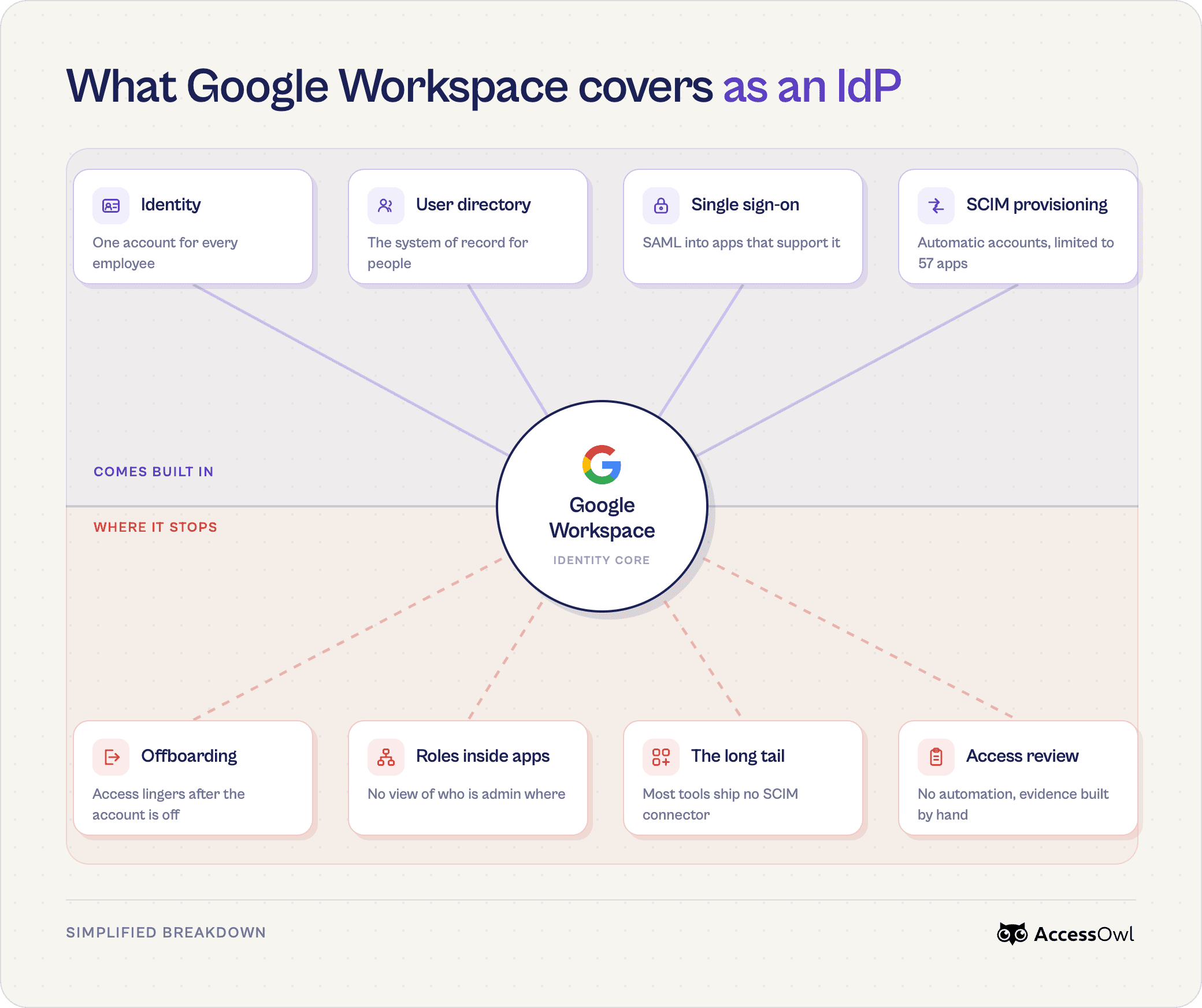
Identity and Access Management (IAM) is the discipline of controlling who exists in your systems and what each person can touch. An Identity Provider (IdP) holds those identities and confirms people are who they claim to be.
Google Workspace acts as an IdP, and for most companies running it, it does more than they realize.
Core Identity Management Features Google Workspace Provides
A managed user directory: the central record where every employee account lives, and the source of truth other tools check against when someone logs in.
SSO via "Sign in with Google": Employees can sign up for apps with one Google account, no separate passwords. At least 1.8 million websites/apps add Sign in with Google to their web app (according to BuiltWith). No configuration needed from an admin to turn on. (Feature Included on every Workspace plan).
SSO via SAML: An admin connects the app in Google's Admin Console so people sign in through Google instead of a separate app login. When the app is set to require SSO, that also stops users from creating their own username and password for it. (Included on every Workspace plan, not tier-capped.)
Multi-Factor Authentication (MFA): A second verification step beyond the password, such as an authenticator app.
SCIM provisioning: Beyond login, Google can create, update, and deactivate a user's account inside Google apps or third party SaaS apps. It works for a limited set of apps. (Included in base plan, but capped based on tier.)
Together these form a foundational identity layer. Google Workspace confirms identity and gates login well. What it does not do on its own is govern the full lifecycle of access across every tool your team touches.
Free Google SSO vs Google's paid identity add-ons
"Google as an identity provider" covers a few things people mix up. Included in every Workspace plan is "Sign in with Google" (the login button most teams already use) as well as SAML based SSO (though many third-party apps gate SAML behind their own enterprise upgrade). The paid part is Cloud Identity (sometimes called "Google Identity"), an add-on that strengthens authentication with device management but adds no governance layer. Separately, Google Cloud IAM controls permissions inside Google Cloud (GCP) not sign-in to your SaaS apps.
The limitations of using Google as an IdP
We asked IT leaders running Google Workspace where it stops working for them. One described it simply: "We use Google SSO basically as an identity provider, but it's not a fully fledged one. The integrations for provisioning and deprovisioning are lacking... it's just not the best solution.". Another was blunter: "It's fine for SSO, but then what about your provisioning, your de-provisioning, RBAC? Is there anything there? No."
The walls they described cluster around the same six triggers that push teams to consider moving to another solution like an all-in-one enterprise IAM platform or an IGA layer that extends Google as the IdP:
Offboarding doesn't fully cascade so any app you forget to revoke by hand leaves a former employee a way back in.
RBAC across third party apps is thin meaning a new hire lands in Slack with none of their channels, or in GitHub with no team.
SCIM provisioning only reaches a short list. Google auto-provisions around 57 apps. That's a tiny catalog, but even other SCIM-based tools typically only reach 15-25% of a real stack.
No native access review workflow so you have to rebuild access control evidence by hand every cycle for SOC 2 and ISO audits.
People can still sign up to apps with a username and password outside Google, so accounts end up living off SSO (also known as Shadow IT).
The Lean Identity Management Stack that extends Google Workspace as an IdP
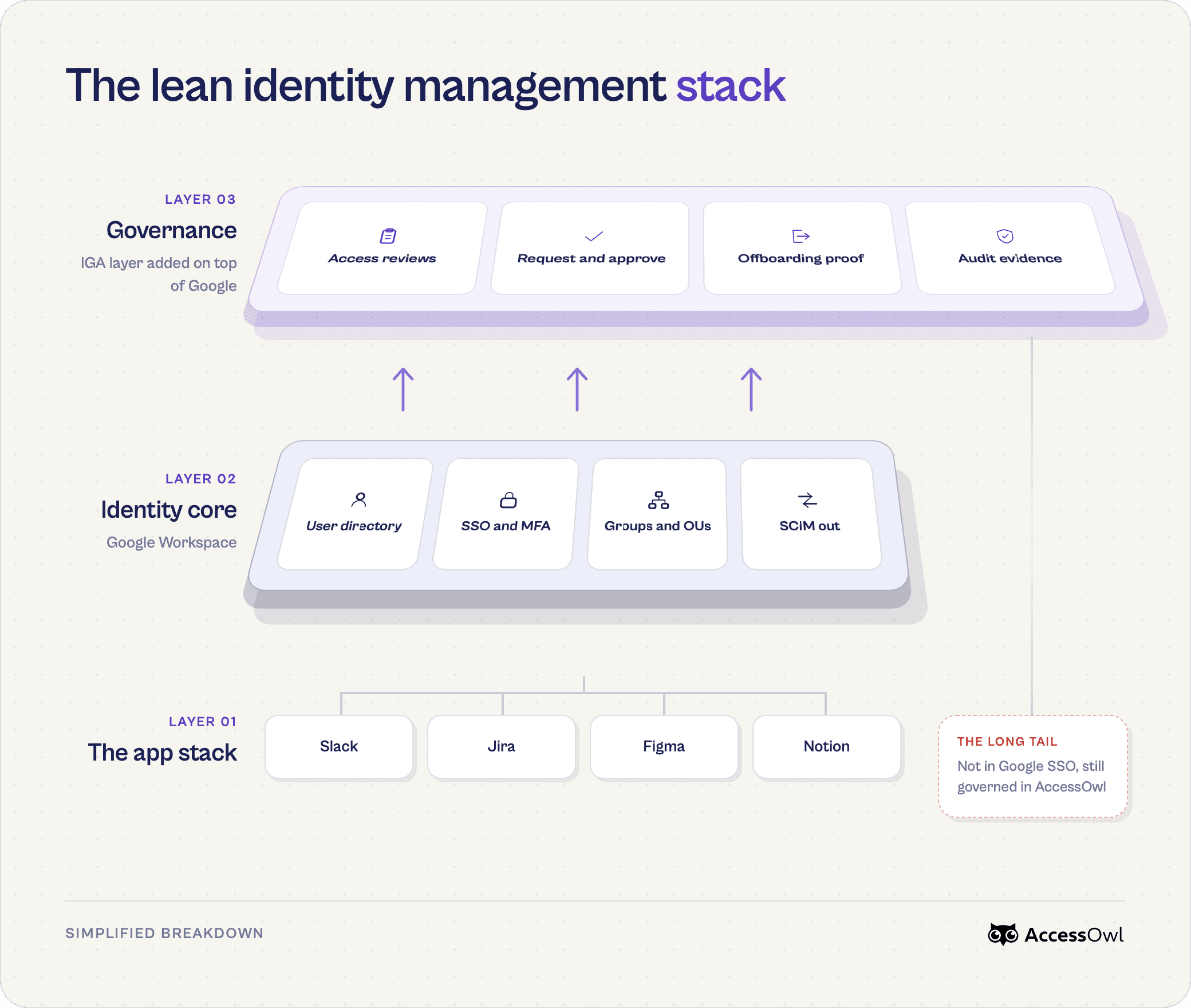
Instead of replacing Google with a second identity provider or moving to a full enterprise IAM platform (with the large price tag and multi-month rollout that come with it) an increasing number of lean teams take a different path.
We call it the Lean Identity Management Stack. Keep Google Workspace as your IdP and add a lightweight governance layer on top of it.
Google keeps doing what it already does well: holding the directory, issuing credentials, and authenticating every login. The governance layer adds what an IdP was never built for: provisioning automation across every app, self-serve access requests, access-review evidence capture, and discovery of the unregistered tools your team signs up for (shadow IT).
Why it's the "lean" stack. It earns the name on three fronts. Cost - you're not upgrading every SaaS app to an enterprise tier to unlock SSO and SCIM. Time - A governance layer goes live in days. Ease of use - You don't certified or trained personnel to run it. Even non-technical personas like HR teams or operations teams can use a lightweight IGA tool.
Lean stack (Google + AccessOwl) | Enterprise IAM (e.g. Okta) | |
|---|---|---|
Annual cost, 100 employees | ~$10,200 | |
Implementation time | Days | months |
People to run it | Generalist IT hires, or non technical staff like HR or Ops. | Often specialized IT personnel |
For a point of reference at 100 users managed, the Lean Identity Management Stack (Google Workspace plus AccessOwl as the governance layer) runs about $10,200 a year. Moving to enterprise IAM like Okta runs around $20,400 a year for the platform itself, plus a potential $200,000 in SSO tax from upgrading each app to the enterprise tier that unlocks SAML and SCIM. Full breakdown in our comparison of enterprise IAM and AccessOwl.
Adding AccessOwl as the Identity Governance layer to Google Workspace
What companies with less than 500 employees actually care about in identity governance
At less than 500 employees, an early IT hire handles every SaaS management task (often alongside security and compliance). You want to automate the work that eats hours every week and this comes down to two things.
1 - Automating onboarding and offboarding. A new hire gets access to all their accounts on day one, and when someone leaves their access is revoked across every app without you opening each tool by hand or piecing together a list.
2 - Audit reports for SOC 2 or ISO mostly build themselves so you're not rebuilding every cycle with screenshots and manually chasing managers to review with little context.
Self serve access requests and shadow IT. Employees should get access to apps they need without flooding you with DMs, and you have a single source of truth to show you exactly who has access to what.
How we use AccessOwl as our IGA layer on top of Google Workspace
We practice what we preach. As a startup we run this exact stack at our own company. Google Workspace as the identity provider, AccessOwl as the governance layer on top of it. Integration accounts are used for most connected SaaS apps instead of SCIM provisioning. That approach lets us automate access management through the full lifecycle even for apps that don't have SCIM support.
Deprovisioning reaches every app
AccessOwl acts inside each app to disable the account and force logout through integration accounts instead of SCIM.
Offboarding as a complete workflow
Triggered by your HRIS or Google at the end of the last workday, it reassigns documents to a manager first, then revokes access across every app, including surfaced shadow IT, and tracks each step to completion.
Provisioning and RBAC without SCIM
A new hire in your HRIS (Google can be the source) triggers a role template that grants the real in-app access, Slack channels, GitHub teams, Salesforce permission sets, across 400+ apps, with no SCIM or enterprise upgrade.
Access review automation
Messages are automatically routed to the right reviewers with context (who approved it, employment status). Flagged access is revoked in the same session and remediation actions automatically logged.
This is the same setup many of our customers run on. Maxio, a two-person IT team supporting 240 employees across 88 apps, used it to take offboarding from hours down to seconds.
It's almost one hundred percent a set-it-and-quit-it situation. AccessOwl sends the tool owners a Slack message the minute an offboarding kicks off, and we get updates almost live: 'It's done.' I could call it an early day on a Friday."- Shane Fritts, Senior IT Manager, Maxio
Capability | Google Workspace (IdP) | Governance layer (e.g. AccessOwl) |
|---|---|---|
User directory / source of truth | ✓ Built-in | Reads from Google Workspace |
Single Sign-On (SSO / SAML 2.0) | ✓ Built-in | Not provided (stays with Google) |
Multi-Factor Authentication (MFA) | ✓ Built-in | Not provided (stays with Google) |
OAuth 2.0 app authorization | ✓ Built-in | Not provided (stays with Google) |
Provisioning | SCIM based, only 57 apps supported | 400+ integrations, based on Integration accounts that don't require SCIM |
HRIS-triggered onboarding / offboarding | ✗ Not available | ✓ Automated via HRIS or Google Workspace profile attributes |
Access removal in downstream apps | ✗ Suspension does not kill active sessions | ✓ Licenses removed and access deprovisioned directly inside each SaaS app |
Access review campaigns (SOC 2 / ISO 27001) | ✗ No native workflow | ✓ Automated access reviews |
Shadow IT discovery | ✗ Invisible to Admin Console | ✓ Surfaced from OAuth logs and invitation-email scanning |
Self serve access requests | ✗ Not available | ✓ Routed, executed, and recorded |
FAQ
Is Google Workspace an identity provider?
Yes. It holds your user directory, authenticates logins, and signs people into other apps through "Sign in with Google" and SAML. Most teams are already running it as their IdP without calling it that. Where it stops is governance: provisioning, access reviews, and clean offboarding.
Can I use Google Workspace as an identity provider?
You already can, and you most likely already are. Any app your team signs into with their Google account is using Google as the IdP. To turn it into a full identity setup, you add a governance layer on top for the lifecycle work Google doesn't do on its own.
Can I just use Google Workspace as our identity provider instead of buying Okta?
For most teams under 500, yes. Google handles the login, and a lightweight governance layer like AccessOwl covers the provisioning, reviews, and offboarding you'd otherwise buy Okta for, without the price tag or the months-long setup. We compare the two directly in our Google SSO vs Okta guide.
Do small companies need an identity provider?
You almost certainly already have one. If your team signs into apps with their Google account, Google Workspace is your IdP. At a small size the real question is whether to add governance on top of it, not whether to go buy a separate identity provider.
Can I manage all our login authentication through Google Workspace?
Mostly, yes. For any app that supports "Sign in with Google" or SAML, Google can be the single login. The exception is apps where people set their own username and password, and those are exactly where accounts slip outside your control. AccessOwl surfaces those so they don't stay invisible.
When is Google Workspace alone enough for identity management?
When you're small enough that manual work is still manageable, roughly under 20 to 30 people on a lean app stack, Google on its own is fine. Past that, offboarding and access reviews start to break down, and that's usually when teams add a governance layer instead of moving to Okta.