

TL;DR
Automating SaaS account provisioning consists of using tools that create and revoke user accounts across all your apps while documenting every step - in a few clicks instead of an admin opening each one by hand. Most teams choose between a dedicated access governance tool or an IdP solution with SCIM. The right call comes down to your size and your stack.
Our own data from 116+ companies found that automating user access management brought down on- and offboarding workflows from ~1-2 hours avg. per employee down to a few minutes.
In this blog:
What it automated provisioning means: provisioning sets people up with the right access when they join; deprovisioning revokes it when they leave, ideally triggered automatically by an HR event.
The 3 ways to do it: a dedicated access governance tool like AccessOwl, your IdP + SCIM (Okta, Microsoft Entra), or a 'free' DIY workflow.
How we automated our own onboarding & offboarding: a step-by-step look at how we run it on our own team (HR trigger, role-based templates, AI-driven seat creation) which took our onboarding from an hour per person down to a minute.
Who should do what: Companies with small IT teams (or no IT team) on Google/Microsoft benefit most from an access governance tool. A full IdP rollout fits once you've got a large dedicated IT team.
What does it mean to automate SaaS account provisioning / deprovisioning?

It means using tools to create, grant, and remove user accounts across SaaS apps automatically (often triggered by an HR event) instead of an admin opening each app and doing it by hand.
Provisioning: Setting someone up with the right access when they join or change roles.
Deprovisioning: The offboarding side is revoking access to all tools when a team member leaves.
Some teams may already be using Google Workspace or Microsoft. These automate authentication - one identity your team signs in with - but don't let you automate specific permissions and seat levels. The real goal of automating account provisioning is to get a new hire the access they need on day one (the right Slack channels, the right repos) and revoking every account on their final day to prevent compliance & security exposure.
Based on our conversations with more than 80 teams, manually onboarding or offboarding takes ~1-2 hours per employee on average. In some extreme cases for compliance-strict orgs it was taking up to 4 hours per employee.
Phillip Eller, Co-founder, AccessOwl
Why does manual onboarding/offboarding break down?

Since access is scattered across dozens of apps with no single system pushing it out or pulling it back - it depends on a single person (or scattered chain of people) knowing "which apps to grant permission for who". That stops working as you grow.
What manual actually looks like
For 'involuntary' IT admins: At companies with no IT department, someone inherits the job without the title: an engineering manager, an office manager, HR, or compliance lead. Their "system" is a handful of spreadsheets (usually disorganized) plus opening each app by hand to add the new person while Slack DMs pile up asking for access.
For small IT teams: A little further along, there's usually some form of ticketing but it's chronically flooded and nobody's confident the access records are truly accurate for audits. Access management ends up eating hours away that should be spent on other work.
We asked small IT teams and non-IT account provisioners what their manual process looks like:
Most of the work lands to the new hire. A list of apps to go register for, one account at a time, on day one.
Even with forms and checklists, it ends up the same. Everything is done by hand
The offboarding problem is worse than onboarding
Offboarding never feels fully complete. With a manual process, it's common to get unpleasant surprises months out when a license bill hits for an ex employee or you stumble on an account with sensitive data that was never revoked. Missing apps during offboarding comes with massive compliance and security risks. Most ex-employees don't have any harmful intentions, but we've seen cases where ex-employees still retain access to AI notetakers or productivity tools with sensitive company info that can be accidentally leaked.
Due to miscommunication we had a case where paid software licenses were not canceled for months without us realizing.
Robert Pötzsch, Office Manager, FinCompare
3 approaches to automate SaaS provisioning and deprovisioning
There are three practical routes: (1) a dedicated SaaS access automation tool that can sit on top of your Google/Microsoft setup, (2) your IdP with SCIM or (3) an improved DIY workflow using tools you already have. For most lean teams the real decision is between Route 1 and Route 2.
Approach | Best for | App coverage | Setup effort / time-to-live | Needs a technical owner? | Audit trail for compliance |
|---|---|---|---|---|---|
Dedicated SaaS access automation tool (e.g., AccessOwl) | Lean teams with a small IT team (or no IT team) on Google Workspace or Microsoft | Reaches the apps your IdP can't, including ones without SCIM/SAML, manually managed internal tools, and Shadow IT, so every app sits in one place | Layers on top of your existing setup with no migration; requires an initial integration setup for each app | No. Approvals and tasks run through Slack so managers can handle them | Yes. Every grant, change, and removal is logged automatically for SOC 2 / ISO 27001 evidence |
IdP + SCIM (e.g., Okta, Microsoft Entra) | Companies with a large dedicated IT team that owns identity full-time | Only the SCIM-enabled apps you've connected, about 15-25% of the tools employees use; the rest stays manual | A rollout that can take months, plus the SSO tax of upgrading apps to enterprise plans to unlock SCIM/SAML | Yes. Managing the security, ops, and onboarding is a project in itself | Yes, for the apps connected through the IdP |
DIY with tools you already have (e.g., workflow with Notion & Claude) | Teams that with less than 25 employees that are not rapidly adding headcount. | Whatever the people following the checklist remember to cover; nothing is provisioned for you | Light to stand up from a Notion page or spreadsheet plus a Slackbot, but it's not truly automated | Informal. It only runs as well as the people following it | None unless you build one yourself |
Route 1: A dedicated SaaS access governance tool
Specialized access governance tools like AccessOwl are built intentionally to automate the admin work of granting and removing access across your SaaS apps. Automated user provisioning is also frequently a feature within other tools:
Specialized IAM (Identity and Access Management) or Access Governance tools.
Wider suites like SaaS management tools and some HRIS tools
Be wary of tools that treat provisioning as a side feature. Some platforms are built mainly for something else (say, spend management or HR) and bolt provisioning on top. Coverage tends to be limited and you're left filling the gaps by hand.
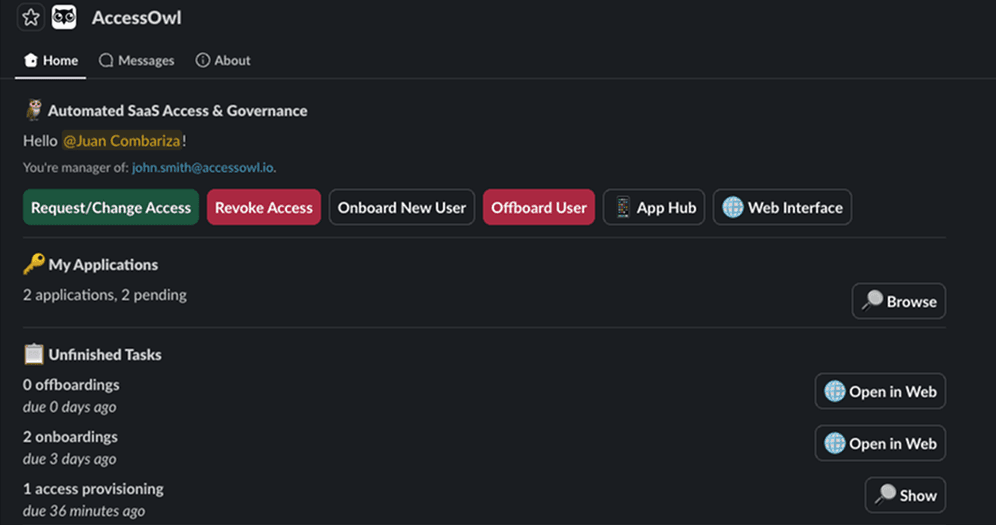
For example, the screenshot above is a dedicated SaaS provisioning tool with a native slack dashboard. We've found that a mission control view and 'ticketing' running through Slack makes the process much easier for our managers - so the tasks get done quickly.
What an access governance tool is good at:
Automating user provisioning (onboarding): When someone joins, it triggers off your HR system and routes each request to whoever owns that app. A new hire's accounts get set up in a couple of clicks, instead of you doing it by hand.
Automating user deprovisioning (offboarding): When someone leaves, an HR trigger prompts you to pull their access back across every app (including Shadow IT) and flags the paid seats you can drop.
One-click provisioning: Build role-based templates once, then grant a new hire their accounts with a single click in Slack. No need to open apps yourself. AccessOwl's AI-driven automation creates the seats in the background.
Compliance documentation: Every grant, change, and removal is recorded for the audit trail SOC 2 and ISO 27001 reviewers ask for.
Reach apps your IdP can't: AccessOwl can connect through service accounts when SaaS tools don't support SCIM/SAML or lock it behind an expensive enterprise upgrade. You can also add manually managed apps (like internal tools) so every app is in one place.
Works with what you already run. No migration or rip and replace. AccessOwl layers on top of Google Workspace or Microsoft Entra.
With an access governance tool, Motion dropped new-hire provisioning from two hours to under thirty minutes, and Maxio took offboarding from an hour per person down to 60 seconds.
Route 2: Identity provider + SCIM (e.g., Okta, Microsoft Entra)
An identity provider paired with SCIM automates provisioning by pushing accounts into the apps you've connected to single sign-on (SSO). It's the route teams with an IT department reach for first, and seen as a standard at larger companies.
Which IdP setups allow you to automate user provisioning:
Google Workspace: Barely. Its provisioning is built mostly to receive users from another IdP, not to push accounts out across your wider SaaS stack. There's no real connector catalog. Most teams hit the ceiling fast.
Microsoft Entra ID (inside Microsoft 365): Yes, but it takes a paid tier. Automated SaaS provisioning requires Entra ID Premium (P1 or higher, included in Microsoft 365 E3/E5).
Okta (specifically Workforce Identity Cloud): Yes, this is what the workforce identity cloud was built for, with a large catalog of pre-built connectors for provisioning and deprovisioning.
But there are concerns worth weighing before you commit:
1. Is your IT operation big enough to run it? An enterprise IdP earns its keep when someone owns identity as their actual job and there's room for a rollout that can take months. Managing the security, ops, and onboarding for Okta or other enterprise IdP's is a project in itself and the enterprise cost is a serious commitment.
2. The SSO tax: SCIM and SAML (the connections an IdP relies on) is gated by many SaaS vendors their most expensive enterprise plans. So automating "the IdP way" can quietly mean upgrading every app in your stack to enterprise pricing, a cost most teams don't picture upfront.
3. It doesn't reach every app: SCIM only automates the apps that offer it and that you've connected. By AccessOwl's analysis of customer stacks, that only accounts for 15 - 25% of the tools employees use. The rest stays manual or gets managed in a separate tool.
If you already have an enterprise IdP it might be a natural step to incorporate SCIM-based provisioning. The mismatch only shows up when that enterprise-grade setup gets pointed at a lean team whose real problem is just the day-to-day admin work.
Route 3: Do it yourself with tools you already have
If you'd rather not add a tool at all, you can build a lightweight system from what you already run. The usual setup: a Notion page or spreadsheet as the single checklist of who needs what, a Slackbot to route each task to the app owner who grants it, and an AI assistant like Claude to orchestrate the requests.
This can reduce the time you spend but it's not truly automated. Nothing actually gets provisioned for you and the checklist only runs as well as the people following it. There's no enforcement, no audit trail unless you build one, and it strains as your headcount and app count grow.
We have numerous resources and templates you can copy if you do decide to stick to a DIY setup, such as our Employee Offboarding Checklist.
How to automate SaaS user provisioning for onboarding (step by step)
Here's how we automated every step in the sequence for our own onboarding processing.
1. Connect your HR system as the trigger.
Your HRIS (Human Resource Information System) - or your directory, like Google Workspace - becomes the signal. When a new hire's start date lands there, provisioning kicks off on its own.
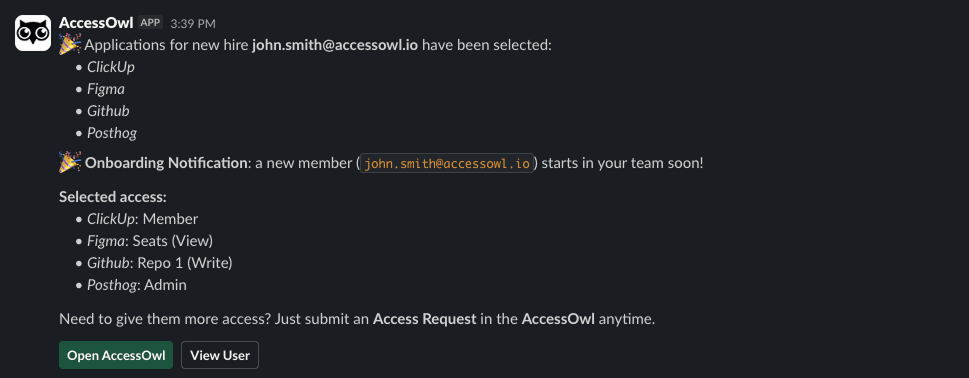
How we do it: a new hire in our HRIS (Deel) automatically triggers an alert in Slack let us who is starting and when.
2. Build role-based templates.
Decide a base template for what each role should get. For example, Engineering gets GitHub, AWS, Jira, and the right Slack channels; everyone gets the default set (email, Slack, Notion). A good template includes seat levels, not just a bare login, so people can actually work on day one.
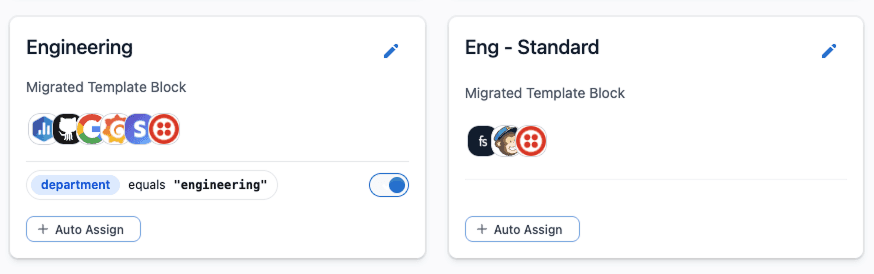
How we do it: We set an "Engineering" template, a "General" template, and a "Contractor" template. When a new hire is coming on board we spend ~30 seconds editing the template to specific seat levels or adding new tools.
3. Route for approval, then grant access automatically.
Send each request to the right approver (usually the manager or app owner) for a quick sign-off. The aim is that approval is the only manual step; the account creation itself should happen automatically across every app in the template.

How we do it: The manager approves with a click in Slack, and AccessOwl creates and assigns the accounts automatically. Anything without an integration is routed to the app owner as a task. Every action is logged for record keeping.
4. Keep an automatic record.
Log who was granted what, and when. You'll want it for access reviews and audits and you don't want to be reconstructing it after the fact.
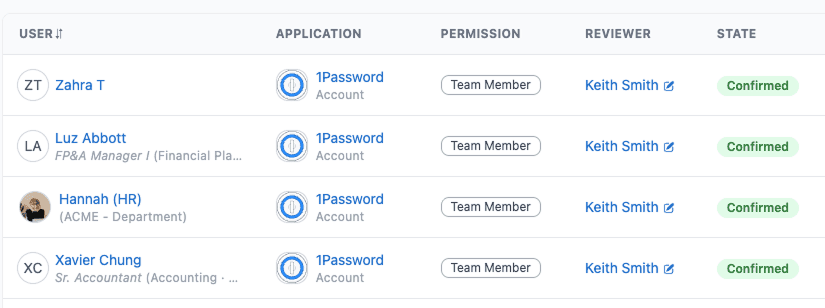
How we do it: every grant is logged in AccessOwl automatically, so our SOC 2/ISO 27001 evidence is ready with an export.
How to automate SaaS user deprovisioning for offboarding (step by step)
Here's how we automated every step in the sequence for our own offboarding.
1. Trigger it from the last working day.
Your HRIS (or directory) already knows someone's leaving. Let their last day fire the offboarding on its own, ideally at the end of that day so a handover isn't cut short.
How we do it: a last day in our HRIS (Deel) automatically kicks off the offboarding in AccessOwl at end of day. It tells us who is leaving, when, and who has offboarding tasks to fulfill.
2. Remove access everywhere (including Shadow IT).
Pull their accounts across every app, not just the ones behind your identity provider. How complete this is comes down to how clean your records are.
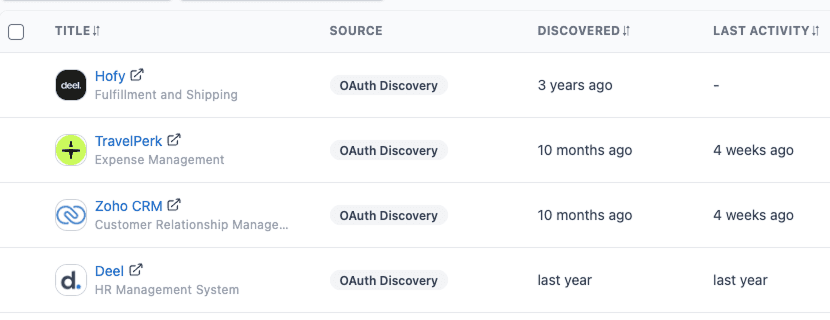
How we do it: one trigger removes access across our 'connected' apps automatically. An AI-driven automation revokes the seat. Anything without a full integration is routed to the app owner as a task. The list of apps to remove includes Shadow IT, by running a scan against OAuth logs in Google Workspace. This reveals apps that the emplyoee signed up for themselves that aren't connected to our access governance records.
3. Confirm it's done, and keep the record.
Verify that account access is actually gone. In practice that means reading the current user list from each tool (through its admin console, an API query, or a service account that can pull users). That record is your audit proof, and your assurance nobody still has a way in.
How we do it: every revocation is logged in AccessOwl automatically, we get a clear "done" across all apps, and our SOC 2 / ISO 27001 evidence is ready with an export.
With a properly automated sequence, our own offboarding time dropped from 1 hour down to 1 minute.
User offboarding requirements for compliance (SOC 2 and ISO 27001) (the short version)
SOC 2 and ISO 27001 expect a controlled access process and an audit usually forces an issue you were already living with. The requirement is simple to state: grant access deliberately, remove it promptly when someone leaves, and be able to prove both.
SOC 2's Trust Services Criteria (criterion CC6.2) call for removing access once a user is no longer authorized, and ISO/IEC 27001's Annex A 5.18 requires access rights to be provisioned, reviewed, and removed across the user lifecycle.
What the frameworks don't give you is the how. They spell out what an auditor expects to see, not how you're meant to produce it.
This is where automation pays off. Because every grant, change, and removal runs through AccessOwl and is logged as it happens, your access records stay accurate on their own so audit evidence is simply a one button export.
For the review process itself, see our SOC 2 access reviews guide and what a user access review involves.
FAQ
How do I remove a former employee's access from all apps at once?
"All at once" only happens if something's wired into those apps for you. That's the job of an access governance tool like AccessOwl: one trigger pulls their access everywhere and revokes the seats. Without a dedicated tool you end up opening each app by hand and hoping you didn't miss one.
Can I automate onboarding and offboarding without Okta?
Yes. AccessOwl runs it on top of the Google Workspace or Microsoft 365 login you already have, no Okta required. Okta earns its place once you've got a large IT team handling identity full-time.
What's the difference between provisioning and deprovisioning?
Provisioning is giving someone their accounts when they join or request new access. Deprovisioning is taking it all back when they leave. AccessOwl automates both ends so you're not doing it by hand.
Do I need an identity provider (IdP) to automate SaaS access?
Yes, but you probably already have one. If you're on Google Workspace or Microsoft 365 (Entra ID), they serve as an IdP or as a directory with a similar purpose. AccessOwl layers on top to automate SaaS access management.
How long should SaaS deprovisioning for employee offboarding take?
By hand, figure 45 minutes to an hour per person. And you'll still probably miss an app. With an access governance tool like AccessOwl it's a few minutes.