

TL;DR:
Google Workspace can define roles through Google Groups and Organizational Units, but those roles stop at Google's own apps. Its automated provisioning for third-party apps is limited. Google SCIM provisioining creates and removes accounts, it doesn't assign permissions inside them. This guide walks through what Google Workspace can do for role-based access on its own, where that ceiling sits for your other SaaS tools, and how to extend it across the rest of your stack with an identity governance tool like AccessOwl.
In this blog:
Google Workspace does role-based access well for its own surface: Organizational Units scope which apps and services are on for a set of users, and Google Groups control eligibility to Google-native resources like Shared Drives and mailing lists.
A Google Workspace role or group does not follow the person into your other SaaS apps. Google's automated provisioning syncs account creation, changes, and deletion but there is no documented way to map roles or license tiers per group.
AccessOwl can be added on top of Google Workspace to extend RBAC to 400+ apps without SCIM, fully automating provisioning and assigning the in-app roles (Slack channels, Jira project roles, GitHub teams).
Stale group memberships and OU drift are the usual ways role-based access breaks down after setup, and manual re-checks of whether a group assignment is still correct months later is error prone.
Why IT admins care about RBAC

RBAC means time saved and cleaner organization. IT admins use the RBAC mechanism so they don't have to to make the same access decision one person at a time. Without it, every new hire is a manual build: 15 tools, 15 separate configurations about what they should be able to see. This is repeated for every person and redone every time someone changes teams. RBAC replaces that with a template. Define what a "Sales Rep" needs once, and every person hired into that role gets it without a new decision being made for them individually. This template approach carries benefits across the entire joiner-mover-leaver lifecycle, such as upgrading permissions when a team member is promoted.
What is RBAC
Role-Based Access Control (RBAC) groups permissions into roles and assigns people to roles based on what their job requires, so nobody holds access their function doesn't need. It is the practical form of the least privilege principle. At a practical level for IT admins, a proper RBAC mechanism means less clicks on admin consoles to grant permissions, and fits within the wider identity governance function that ensures the right people have access to the right apps.
Three approaches to RBAC if your team uses Google Workspace
RBAC for Google Workspace's own apps and resources is a separate job to be done from RBAC for the third-party SaaS tools you sign into through Google. The two have very different ceilings. For role-based control to third party apps (Slack, Notion, GitHub) Google Workspace's native features can create the account but rarely assign roles or granular level permissions.
Approach 1: Native RBAC for Google Workspace apps. Admin roles and organizational units, for governing who administers Workspace and which Google-native apps (e.g. Google Drive folders) people reach.
Approach 2: RBAC for third-party apps with an IGA tool + Google Workspace. An identity governance (IGA) tool sits on top of Google Workspace to further automate onboarding (user provisioning) and offboarding (user deprovisioning).
Approach 3: RBAC for third-party apps with native Google features. SCIM provisioning or SAML account access, which reach outward to some connected tools but stop short of granular roles.
It is becoming increasingly common for IT teams to use Google Workspace as an IdP (Identity Provider). Google Workspace handles the SSO and directory aspects of identity governance quite well for a very low price compared to dedicated identity solutions. But companies tend to look for an alternative or extension when they run into the limitations of RBAC and automated provisioning.
RBAC capabilities within Google Workspace
Google Workspace has three mechanisms that together approximate RBAC: Organizational Units, Google Groups, and automated provisioning
Mechanism | What it controls | Scope | Key limitation |
|---|---|---|---|
Organizational Units (OUs) | Which Google apps and services are turned on for a set of users. Can control SAML app access as well. | Google-native only; a user belongs to exactly one OU | Single-parent tree can't model two dimensions (e.g. department and region), and deep nesting gets unmanageable |
Google Groups | Google-native resources (Shared Drives, mailing lists, GKE) and eligibility for who gets provisioned into a connected app | Cross-cutting; a user can belong to many groups at once | Scopes who gets an account, not what they can do inside it; stale memberships linger unless manually pruned |
Automated provisioning (SCIM) | Basic account lifecycle in connected SaaS apps (create, modify, delete) | 3 apps on Starter tiers, up to 100 on Business Standard/Plus and Enterprise | No documented way to map roles or license tiers by OU or Group; syncs the account, not the in-app role |
Organizational Units (OUs)
An Organizational Unit is a hierarchical slice of your directory, usually a department or region. OUs decide which apps and services are turned on for a set of users and you can scope an admin role assignment to a single OU so a manager administers only their own people instead of the whole Google domain.
For example: A new hire joins the "Sales" OU, which automatically turns on Salesforce and the Gong SAML app for them.
The limitation of OUs: a user belongs to exactly one OU. That single-parent tree works cleanly for one dimension, but the moment your model needs two, say department and region at once, OUs alone can't express it. Deep OU nesting also gets hard to reason about fast, and a role that legitimately needs to span two branches has nowhere natural to live.
Google Groups
Groups are the flat, many-per-user counterpart to OUs. A user can belong to lots of groups at once, which makes them the natural fit for Google-native resources like Shared Drives and mailing lists where group membership maps cleanly onto a role. Groups also scope eligibility for provisioning: they can decide who gets an account in a connected third-party app, even though they stop short of setting what that person can do once inside it. Since 2020, Google Groups can also control SAML app access directly.
For example: A designer gets added to the "Design Team" Google Group, which grants them the shared Figma Drive folder and turns on the Figma SAML app, without anyone touching their OU.
The limitations of RBAC for third-party apps with Google Workspace
Some teams that run into the walls of RBAC with Google Workspace consider moving to a tool like Okta (Workforce Identity Cloud). For a team without a dedicated identity function, usually under 500 employees, that's often overkill: it's built for a scale of environment most of these teams haven't reached yet. We cover this in depth in our Okta v.s. Google SSO blog.
In conversations with 80+ IT teams, we frequently ask what frustrates them most about running access on Google Workspace.
"It's fine for SSO, but then, what about your provisioning, what about your de-provisioning, what about RBAC? Is there anything there? No."
"Google is great for Google-centric things, but once you go external, I don't find it to be very intuitive or easy... The SAML, the provisioning, all that downstream work."
The limits of RBAC triangulate around the same three issues:
Google's own SCIM-based provisioning can create and delete an account in a third-party app, but it stops there. It doesn't assign the granular in-app permissions a role actually needs.
Google SCIM support tops out at around 57 apps. And many SaaS tools gate SCIM/SAML support behind an enterprise-tier plan which leads to unexpected costs.
Google's RBAC handles access to its own apps well, but without a governance layer on top group assignments drift: manually checking months later whether groups are still correct is an error prone process.
Extending RBAC to third-party SaaS apps with AccessOwl + Google Workspace
For teams looking for a lightweight identity management stack, the natural choice is to add an identity governance automation layer on top of Google Workspace. AccessOwl sits on top of Google Workspace as a governance layer that extends RBAC and automated provisioning to third party SaaS apps. It reads Google Workspace as an IdP and Google continues to handle SSO.
With AccessOwl's Integration Accounts, provisioning is fully automated across 400+ apps, no SCIM required. AccessOwl assigns granular permissions: Slack channels, Jira project roles, Notion workspaces. This is 80 to 90% of actual provisioning work.
How To Setup RBAC with AccessOwl + Google Workspace
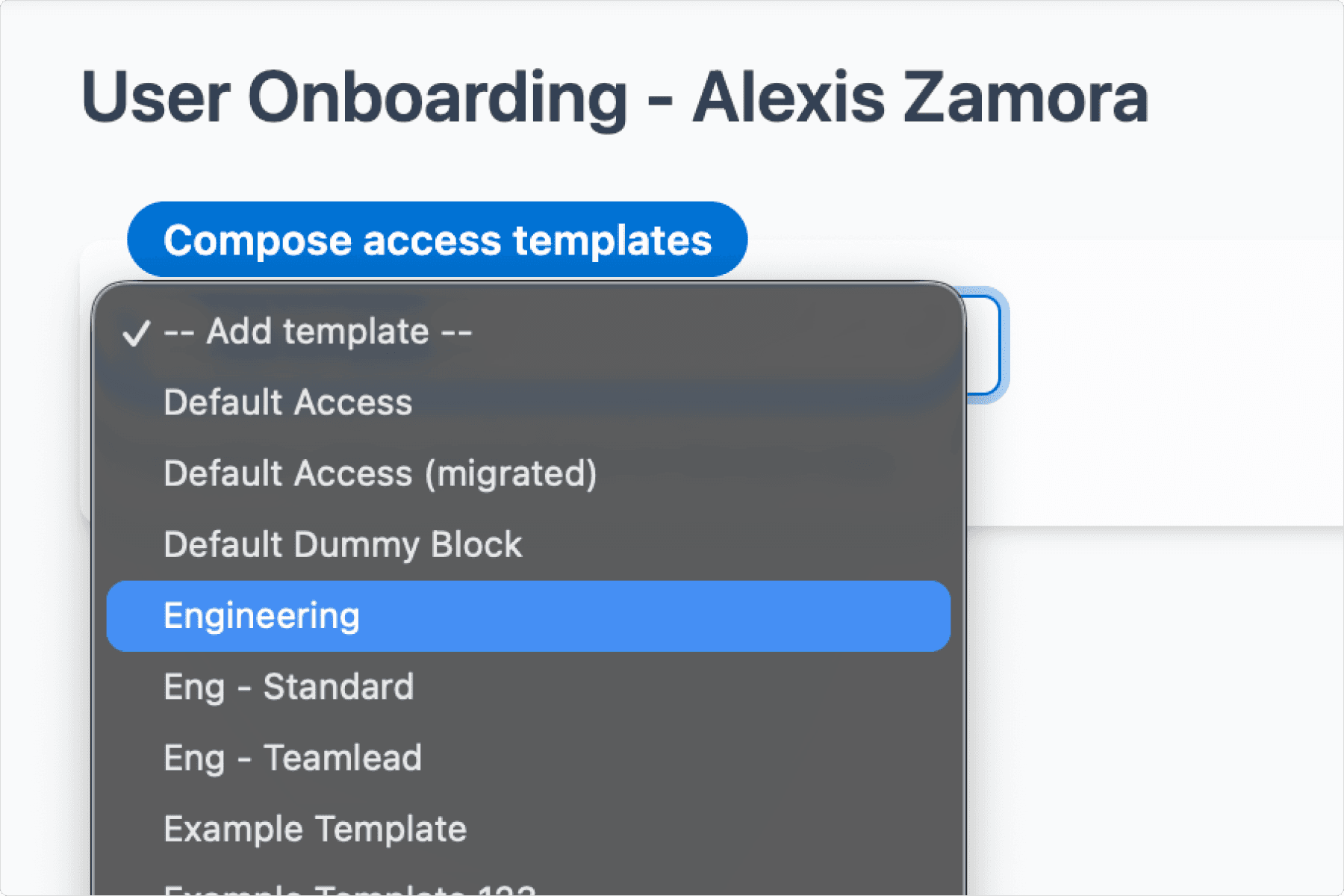

Create templates in a UI. Select Google Workspace OUs, plus third-party apps and access details (for example, read/write permissions to specific GitHub repos).
When a user is onboarded, simply select their template and make one-off changes if needed in the same screen.
Once the IT admin or onboarding owner kicks off the onboarding process, managers are notified to approve the provisioning (1 click). AccessOwl's integration accounts then carry out the provisioning (creating the account, placing the user in the right groups, etc.) and notify the employee that their account is ready.
AccessOwl also handles provisioning within Google Workspace itself, which helps solve access drift in Google Workspace:
Google group membership is tied to the AccessOwl role template, so memberships are added and removed automatically when someone's role changes or they offboard.
Google permissions are run through access reviews on the same cadence as any other app, so all memberships get checked instead of sitting unexamined.
a Google Group can be set up as its own requestable resource, so joining one requires the same approval step as requesting any other app as opposed to letting teams directly change group memberships outside of IT's visibility.
"I was impressed that with AccessOwl I could grant users access and programmatically provision their accounts without having to upgrade to the enterprise tier of the company's applications. Other solutions I'd investigated worked only with specific APIs (SCIM and/or SAML), which would often require enterprise upgrades."
- Ethan Yu, Cofounder & COO, Motion
RBAC Best Practices for Google Workspace Admins
While RBAC is a standard practice, two failure modes do exist that teams fall into. There is no recertification built in so nobody re-checks whether a group assignment is still correct months after it was made. And group sprawl compounds it: temporary access grants harden into permanent memberships, and overlapping groups quietly stack permissions no one intended to hand out.
A few habits keep RBAC from drifting into a mess:
Define roles before you assign them. Write down what each job function actually does, then map permissions to that. Start from the work, not from a person's current access.
Name Groups by a consistent convention (team, resource, access level) so anyone can read a membership list and know what it grants. Audit those lists on a fixed cadence.
Keep a written offboarding checklist that revokes access inside each app, beyond the directory itself.
FAQ
What's the best IGA tool for a team on Google Workspace?
For a team already standardized on Google Workspace and without a dedicated identity function (usually under 500 people), the best fit is a lightweight governance layer that sits on top of Google rather than replacing it. Enterprise suites like Okta Identity Governance or SailPoint are built for a scale most of these teams haven't reached and tend to be overkill. A tool like AccessOwl reads Google Workspace as your IdP, lets Google keep handling SSO, and extends RBAC and automated provisioning to 400+ third-party apps without SCIM, assigning the granular in-app roles that Google Groups and OUs leave empty.
Why doesn't Google Workspace SCIM provisioning cover most of our SaaS stack?
Google Workspace's automated provisioning catalog is a fixed list of roughly 57 apps (per Google's published automated provisioning catalog), and that ceiling does not expand as your stack grows. On top of that, SCIM support in many apps is gated behind enterprise-tier plans, so even when a vendor technically supports it, unlocking it often means a costly upgrade. The result: SCIM realistically covers a small fraction of a typical SaaS stack, leaving the rest requiring manual work.
How do I implement RBAC in Google Workspace without enterprise-tier upgrades?
Use Google Groups as role proxies for app and resource access, scope admin roles to the narrowest Organizational Unit (OU) that covers the job, and layer SCIM provisioning only where it exists natively. For everything outside Google's ~57-app catalog, you need a governance layer (like AccessOwl) that uses service accounts and browser automation to reach apps that SCIM can't, without forcing enterprise plan upgrades across your stack.
Google Workspace RBAC vs. a dedicated access governance tool: when does native stop being enough?
Google's native mechanisms (admin roles, OUs, Groups, and SCIM) are enough when your stack is small, your team is under 20 people, and offboarding is still manageable by hand. The model breaks when group memberships drift after role changes, when offboarding means chasing down access across tools outside the 57-app catalog, or when an audit requires evidence that access was formally reviewed and revoked.