

TL;DR
Before the shiny enterprise IdP, Google Workspace is the most common platform that IT admins use to manage employee access governance. It holds the directory, and "Sign in with Google" is the de facto SSO for everything else. When someone leaves, the reflex is to open the Admin console and suspend their account. In many cases suspending a Google account won't fully revoke a former employee's access to your other apps.
This is one of the many limitations IT admins hit when offboarding through Google Workspace. Even so, we believe Google Workspace is the right SSO choice for companies that don't have a dedicated identity team (usually <1000 employees).
In this blog:
A step-by-step runbook for offboarding employees with Google Workspace's native features (sign out > reset password > remove recovery methods > remove Google groups > data handover > delete).
The apps that Google Workspace offboarding frequently misses.
Turning the process into a repeatable script with Google Apps Manager (GAM).
Why layering an IGA solution like AccessOwl on top of Google SSO is the only way to truly remove access to all company apps.
How to offboard a user in Google Workspace (step by step checklist)
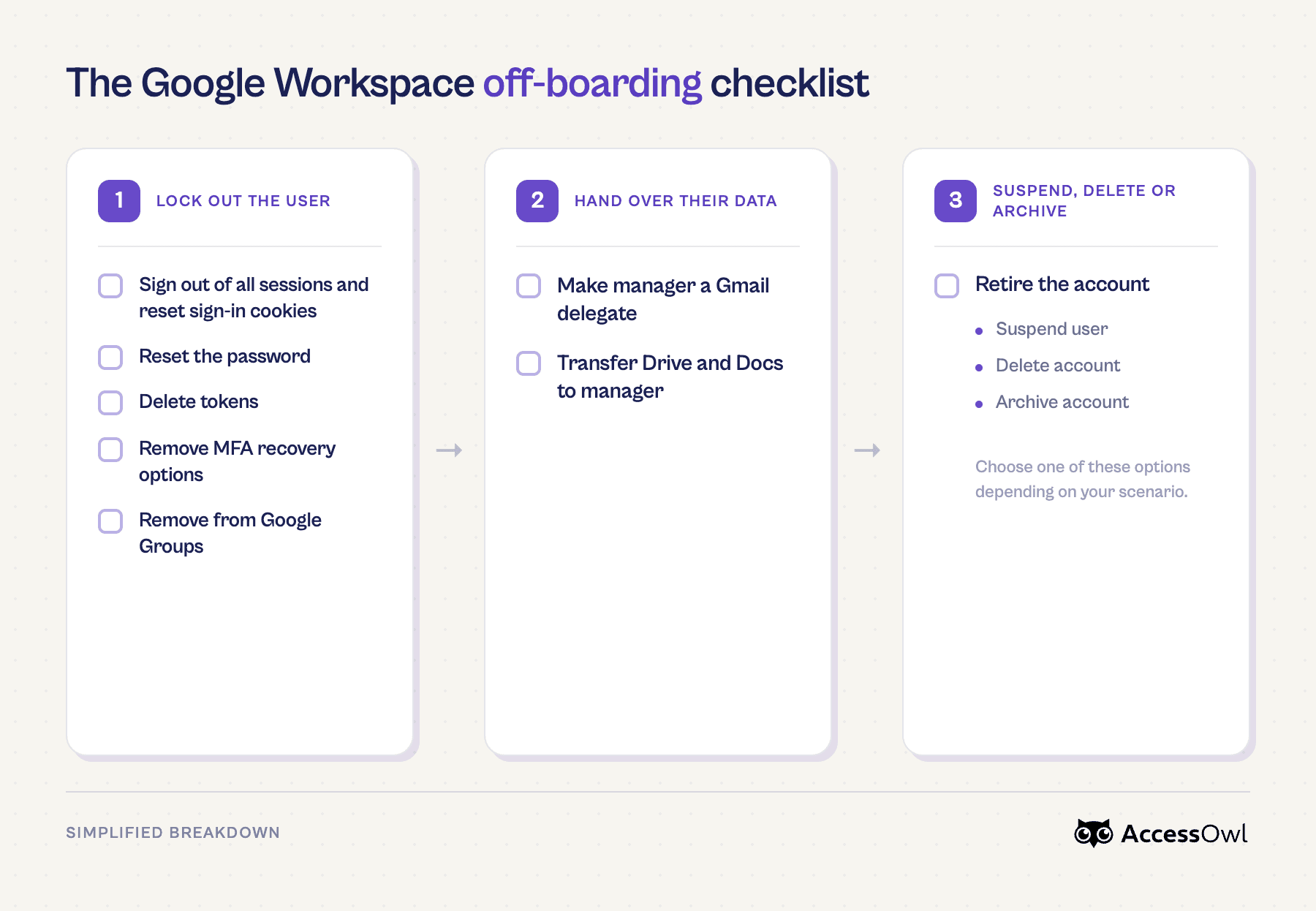
When someone leaves, the reflex is to hit Suspend and move on. But suspending locks you out of the mailbox and files you may need to hand over, and on its own it leaves plenty of access alive. The runbook below is a full sequence in order: kill sessions and recovery options before you suspend and transfer data before you delete. Most steps of these steps can be automated with Google Apps Manager (GAM) commands (an open source tool).
But there's a ceiling here. Because this is all Google SSO–based access management, even a perfect run of this runbook won't remove access to apps outside Google workspace's reach. To get closer to revoking access everywhere (and automate the compliance documentation that proves it), you need a deprovisioning tool that layers on top of Google Workspace.
Runbook Phase 1: Lock out user, but keep account active for data handover
Sign out of all sessions + reset sign-in cookies
How: Security → Sign-in cookies → Reset. Link to Official Docs
Note: doesn't touch Gmail/Drive-for-desktop or third-party apps.
Reset the password
How: Directory → Users → user → Reset password. Link to Official Docs
Note: locks user out. Useful side effect: revokes OAuth tokens for mailbox-scope apps and invalidates application-specific passwords.
Delete tokens, remove MFA recovery options
How: Directory → Users → user → Security → Application-specific passwords / 2-Step Verification / Connected applications (revoke each). Link to Official Docs
From here you can edit/remove OAuth access tokens, application-specific passwords (ASPs), and 2-Step verification paths like recovery email and recovery phone. This ensures the user can't recover their account.
Hide from the Global Address List / directory
How: Directory → Users → user → User information → Directory sharing → off. Link to Official Docs
Note: Drops them from org autocomplete/search. Doesn't remove access on its own.
Remove from Google Groups + reassign groups they own
How: Directory → Groups (remove member). If the user owned a group, set a new owner. Link to Official Docs
Note: Groups are commonly used as access control / "security" groups. If access was granted to a shared drive or third party app through a group, suspending the account or removing them from the drive directly won't revoke it. You must remove them from the group.
Runbook Phase 2: Data handover
Move the ex-employees email, files, and calendar to their manager while the account is still active to hand them over cleanly.
Make the manager a Gmail delegate
How: Enable org-wide at Apps → Google Workspace → Gmail → User settings → Mail delegation; then Directory → Users → user → delegate email. Link to Official Docs
Note: Org-wide mail delegation must be enabled first; gives the manager access to in-flight threads.
Transfer Drive/Docs to the manager
How: Account → Data → Data transfer (or during the delete flow). Link to Official Docs
Note: Do this before deletion. A failed transfer halts deletion. Shared Google drive files are organization owned.
Runbook Phase 3: Suspend, delete, or archive user
A standard approach is to suspend right after the last working day and hold the account for 30–90 days before deleting. 30 as a floor, 90 if compliance evidence or a possible dispute is in play.
Suspend the user: Directory → Users → user → More options → Suspend user. Link to Official Docs. Note: Suspended accounts are still billed at the full rate, so this is a hold.
Delete the account: Directory → Users → user → Delete user; or assign an Archived User license. Link to Official Docs. Note: Deleting reclaims the license (Annual plans free it to reassign; Flexible prorates).
Option | What happens to access | Their data | Cost / license | Reversible? | Best when |
|---|---|---|---|---|---|
Suspend | Blocked immediately; can't sign in (Google side only) | Fully retained, untouched | Still billed at the full rate | Yes, instant | Short-term hold during your retention window; you might reinstate them |
Delete | Google identity removed; "Sign in with Google" permanently stops | Erased after a 20-day restore window (including Vault) | Frees the license (Annual: reassign it; Flexible: stops the charge) | Only within 20 days, then permanent | No retention need and data's already transferred; you want the seat back |
Archive (Archived User license) | Blocked; can't sign in | Kept read-only, searchable/exportable in Google Vault | Much cheaper than a full seat (not free) | Yes, unarchive | You must retain data for compliance or eDiscovery without paying full price |
Does suspending or deleting a Google Workspace account remove someone's access to all of our company apps?
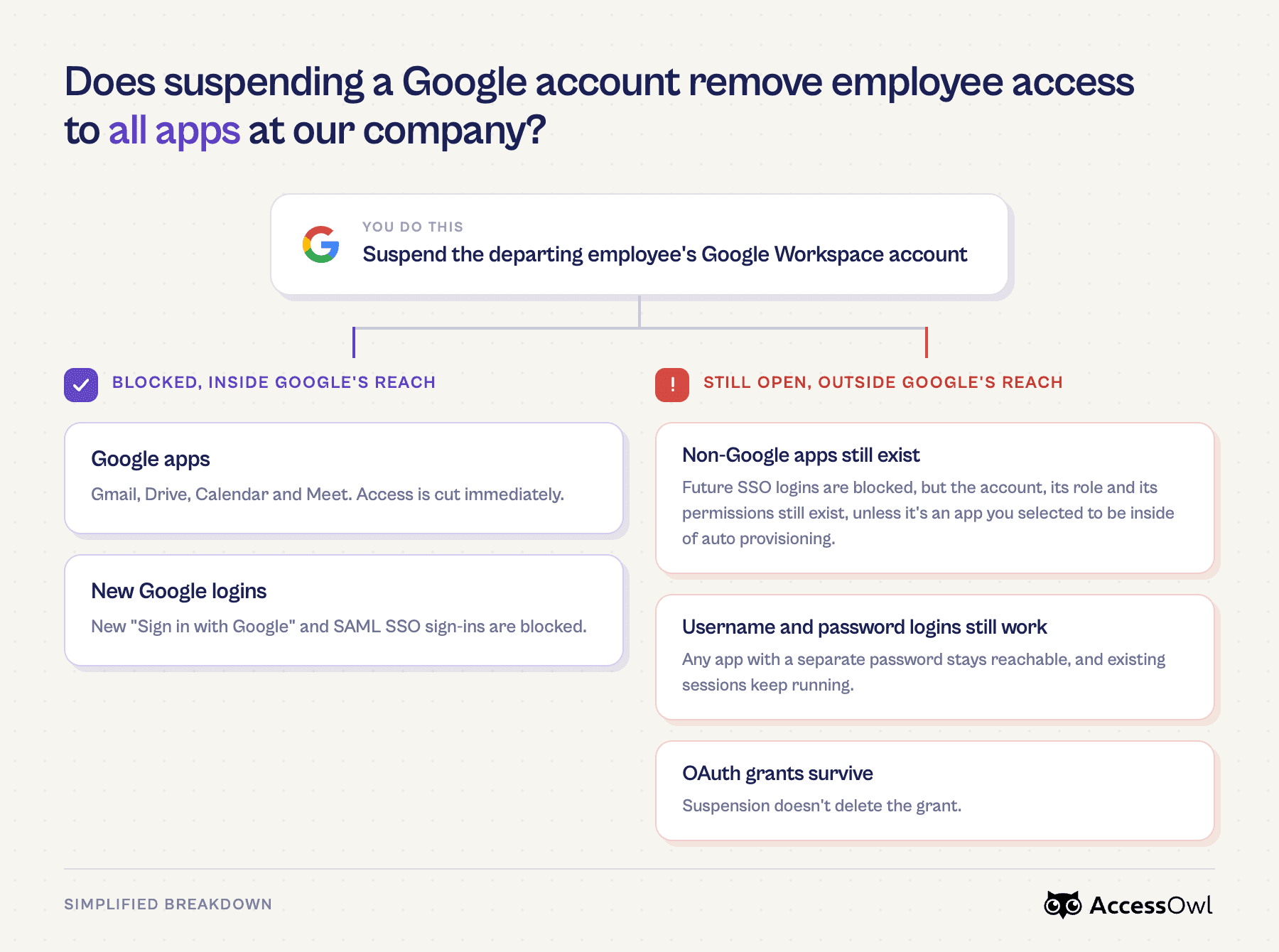
No, not on its own. Suspending or deleting reliably cuts them off from Google itself: Gmail, Drive, and any new 'Sign in with Google' login. For the curated set of apps where you've turned on Google's automated provisioning, it also deactivates the downstream account. But Google's provisioning catalog is limited at only at 57 apps so most of your 3rd-party apps stay wide open to the person who just left.
This isn't a Google flaw. The same gap sits behind every identity provider. Even though tools like Okta have a larger SCIM catalog they don't reach the long tail of apps that were never wired to SSO or SCIM.
When Khalifah Alsadah explained how he automated offboarding as Sary scaled past 600 employees, he mentioned:
In one instance I found out that a former employee was still using a critical internal system 3 months after he left.
What Google Workspace offboarding misses
Coverage depends on your setup and environment, so not all of these apply to everyone, but here's the access we most commonly see slip through when a Google account is suspended or deleted:
SSO logs them out but doesn't remove the account: Unless the app is managed under Google auto provisioning, suspending the Google account just blocks future logins using the "Sign in with Google" button. Their actual account in the app is still sitting there until you go in and delete it.
The non-SSO long tail: Apps someone signed into with a separate username/password (or a personal email). They were never behind Google, so suspending the Google account touches nothing.
"Sign in with Google" OAuth grants survive: Suspension doesn't delete the grant. The app's access comes back the next time they sign in unless you block it and the separate app account is never deleted.
Access regained through recovery methods: If you leave a recovery email/phone (or a live session) in place, an ex-employee (but more frequently an attacker) can get back in via account-recovery flows.
By the time you're around 100 people with dozens of apps, closing these gaps by hand on every exit isn't realistic. Across the SaaS stacks we see, SCIM-based provisioning reaches only about 15–25% of the tools actually in use. That's when teams lay an automated deprovisioning tool like AccessOwl on top of Google Workspace.
How to automate Google Workspace deprovisioning & offboarding
You can automate the full offboarding process (the Google account plus the downstream apps, including the ones with no SCIM coverage) by adding a IGA layer like AccessOwl on top of the Google SSO you already have. There are other DIY routes too, like scripting it with the open-source GAM tool.
Automating Google Workspace Offboarding with GAM
GAM (Google Apps Manager) is a free, open-source command-line tool that drives the Admin console through Google's Admin SDK.
Instead of clicking through Directory → Users for every leaver, you run the runbook as a script and save it to reuse on the next exit.
A pseudo-code demonstration of this looks like:
(Command is illustrative and vary by GAM version. Full walkthrough with commands are in our GAM beginner's guide.)
Automating offboarding without SCIM, Okta, or expensive enterprise tools
The industry standard path to automating provisioning is to use SCIM through an IdP, but this is where the bill explodes. SCIM and SAML based SSO are locked behind each app's priciest enterprise tier. It's called the SSO tax (ssotax.org catalogs it) and it adds up fast: HubSpot, for example, runs about $46/mo on a standard plan but jumps to $3,600+/mo for the enterprise tier that unlocks SSO/SCIM.
AccessOwl automates the same offboarding using Integration Accounts. An Integration Account works similar to service accounts, and in each app they act through the admin interfaces (a mix of APIs and browser automation). Because it doesn't depend on SCIM, you never upgrade a SaaS seat to enterprise just to automate access management and the automation reaches your whole stack, including the long-tail apps SCIM never covers.
How AccessOwl helps you automate Google Workspace deprovisioning & offboarding
Google Workspace alone | Google Workspace + AccessOwl | Okta (Workforce Identity) | |
|---|---|---|---|
Provisioning & deprovisioning | Great for Google's own apps. Automatic sync only for a small SCIM-style catalog (about 57 apps, tier-gated). Everything else is manual. | Deep automation through Integration Accounts, with no SCIM and no enterprise-tier upgrades. One-click, zero-touch onboarding and fully automated offboarding. | Broad SCIM-based provisioning, but each app usually needs its own enterprise tier to turn SCIM on. |
App coverage (the long tail) | Not covered. Password-only and unlisted apps stay manual. | 400+ apps, including non-SSO and no-SCIM tools. Anything not integrated becomes a tracked task, plus shadow-IT discovery. | Limited to apps with SCIM or SAML, typically enterprise-tier. |
Setup & best fit | Already in place. Fine until your stack outgrows it. | Live in days, no identity team needed. Built for small and mid-market teams. | Months-long rollout. Suited to enterprises with a dedicated identity team. |
Cost | Included with Workspace (very low marginal cost). | Priced for small and mid-market teams. No per-app enterprise upgrades. | Enterprise pricing, plus the SSO-tax upgrades across your stack that can add tens of thousands a year. |
AccessOwl is an identity governance and administration (IGA) layer that plugs directly into Google Workspace. It connects through Integration Accounts and provisions and deprovisions without SCIM or SAML. The Google Workspace integration is native so you can start automating offboarding in days instead of standing up a months-long identity project.
Enterprise-IdP outcomes, without the enterprise project: You get the access governance and lifecycle automation teams reach for an IdP like Okta to get at a fraction of the cost, live in days instead of months, and with no dedicated, trained admin to keep it running.
Advanced automation: Role-based access control (RBAC) and role templates, plus a Slack integration that lets you approve and run offboarding with a button click. You don't have to open each app manually..
Compliance documentation: Every action is logged for compliance and access reviews, so your audit evidence builds itself instead of turning into another spreadsheet.
This is the best option for lean IT teams that want to propose a solution to their team with immediate wins on offboarding automation without a massive enterprise budget approval needed.
Customers use AccessOwl to cut offboarding from around two hours per employee to under 30 minutes (Motion) and to make sure an exit actually removes access from all apps, including Shadow IT that typically gets missed.
Catching Shadow IT in Google Workspace
You can't offboard an app you don't know was used by that employee. Microsoft reports IT admins usually estimate 30–40 cloud apps in use when the real number is often 1,000+, with roughly 80% of employees using apps IT never sanctioned.
There is a way to do a basic scan that will catch some of these immediately. Every time someone uses "Sign in with Google," it's recorded as an OAuth grant in your Workspace audit logs, so reviewing those logs (Reporting → Audit and investigation → OAuth log events) surfaces the apps people signed into with their work account. Even ones nobody approved.
If you'd rather not comb through logs by hand, AccessOwl runs an instant, free Shadow IT scan that reads those OAuth logs and lists every app in about five minutes. Run a free Sahdow IT scan. If you want a more advanced look into Shadow IT including accounts that were created with username + password instead of Sign In with Google, you can read our article on detecting Shadow IT.
FAQ
Does deleting a Google Workspace user remove their access to all of our company apps?
No, not all of it. Deleting the account locks them out of Google itself (Gmail, Drive) and kills the "Sign in with Google" button for good, and it deprovisions the small set of apps you've wired into Google's automated provisioning. But anything with its own password, or any app not on that list, keeps working until you go and remove them there yourself.
How do I remove an employee's access to apps without SCIM-based provisioning?
You've got three options. You can do it by hand in each app, script the Google side with the free GAM tool, or use a governance layer like AccessOwl that handles it across all your apps through Integration Accounts, with no SCIM and no pricey enterprise upgrades. Doing it manually is fine for a couple of apps, but it stops scaling pretty fast.
Does Google Workspace support automated de-provisioning?
It does, but only for a limited set of apps. Turn it on for a supported app and suspending or deleting someone pushes that change downstream within a few hours. The catch is the list is small (around 57 apps, and only on Business Standard, Business Plus, and Enterprise plans), so everything outside it is still on you.
What apps are covered with Google SCIM-based provisioning?
About 57, and they're mostly the big names you'd expect: Slack, Notion, Salesforce, Box, Dropbox, Figma, Atlassian, AWS, and Office 365 (here's Google's full list). The thing to notice is how short that is next to the 200-plus apps Google can do SSO for, and the 100-plus most companies actually run. So the marquee apps are covered, but your long tail isn't.