
TL;DR
Most teams don't run their first real review for good hygiene, they run it because an auditor is coming. You're a few weeks out from SOC 2 or ISO 27001, and you realize you can't easily answer: who has access to what right now, and is it the minimum access needed for their job?
The process for most teams ends up being manual exports from each app, consolidating spreadsheets, and nudging colleagues again and again to complete their review. The standardized best practices below help you bring more structure to the process whether you're doing it manually or are an early IT hire looking to automate some of the steps.
In this blog:
Steps to run a user access review
Best practices for a succesful audit
A Google Sheet template to help you get started for your first review
When manual user access reviews break and how to automate the work with tooling like AccessOwl
Why user access reviews are important
A user access review is the periodic check that all team members only have the access to applications that is appropriate for them. Anyone who has more access than they should is remediated.
A full exploration is covered in our article What is a user access review?
In a conversation with a product manager at Sary (a 600-person company with more than 100 SaaS tools) we heard how far access can drift before anyone notices: "In one instance I found out that a former employee was still using a critical internal system 3 months after he left." Three months of live access to a critical system, discovered by accident. That's the quiet cost of not looking.
And looking isn't optional once you're selling to customers who care about security. As Harald Prokop, CTO at Just Appraised, put it: "SOC 2 is very clear: you're not going to get by an auditor without an access approval process."
How to run a user access review, step by step process
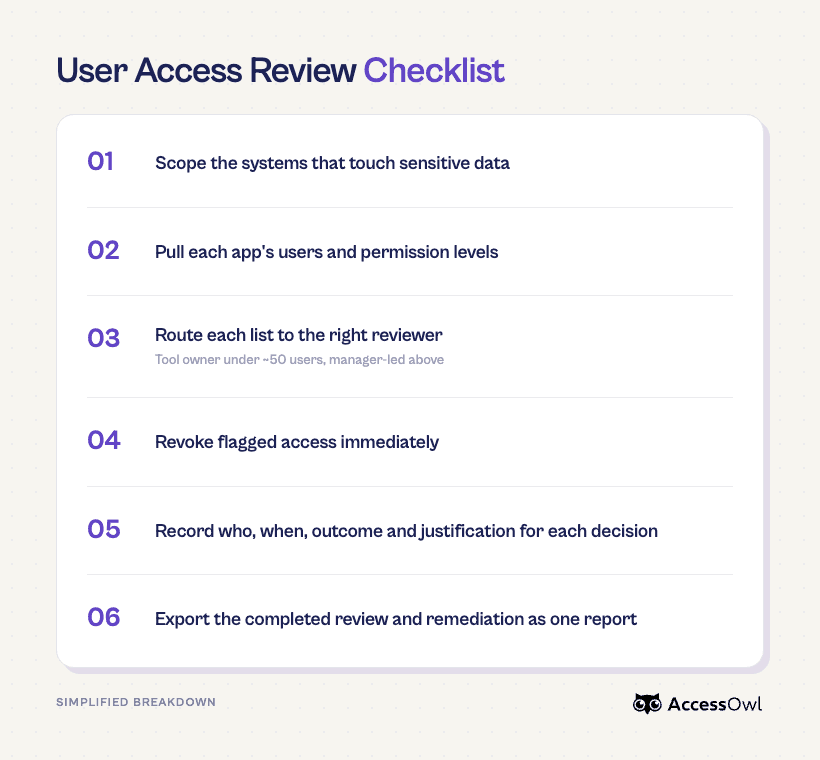
The five steps below are essentially the same for everyone: scope what's in, pull the access data, route each list to the right reviewer, remediate what's wrong immediately, and save the evidence. What changes is execution based on your size and if IT personnel or tooling is available
Past 50 employees, doing access reviews manually noticeably breaks and eats up considerable time from IT personnel (or others inheriting the compliance duty). You'll find yourself spending weeks consolidating spreadsheets and asking managers to review lists with little context. Leveraging a tool like AccessOwl cuts down time spent per app from 2 hours to 10 minutes.
Step 1: Scope what's in
List every system that stores, processes, or transmits sensitive or customer data, plus the systems that grant access to them: your identity provider, cloud infrastructure, code repositories, production databases, and any SaaS app holding customer data.
How do you know what's actually in scope? In plain terms, a tool is in scope if the wrong person having access to it could expose sensitive data, customer data, or break the service. That pulls in the systems above and usually leaves out tools that never touch sensitive data. If an audit is driving the review, the boundary isn't fully yours to draw: your auditor has the final say on what's in and out, so confirm the edges with them early. The official criteria describe the principle rather than a fixed app list (for SOC 2, that's AICPA's Trust Services Criteria).
For example: AWS, GitHub are in scope. A standalone design app with no customer content is not in scope. HubSpot CRM contains customer data so it is in scope.
Step 2: Pull each app's users and permissions
For each in-scope app, get the current list of who has access and what they can do. In practice that means using the tool's export or CSV feature where it has one. Some teams will screenshot the users and permissions page, but this is not recommended as it makes data consistency difficult.
Capture the same columns for every app so the lists stay comparable: identifier (username or email), role or permission level, group or team membership, last login, and the date access was granted. This may change app by app.
Step 3: Route each list to the right reviewer
Send each list to the person who actually knows whether the access is still needed. Under about 50 users in a tool, that's usually the tool owner who knows everyone on it. Above that, route to each employee's manager, since the owner can no longer track every person.
Don't forward the raw export. Give each reviewer only their own people, with the context columns from Step 2 attached, and a clear ask: confirm, downgrade, or remove, each with a one-line reason. Without that structure, reviewers default to "looks fine" and the review becomes unreliable.
Step 4: Remediate immediately
When a reviewer flags an account, revoke or downgrade it in the same pass, not in a ticket that sits for three weeks. That gap between flagging and fixing is exactly what an auditor scrutinizes, and "removed same day" reads very differently from "removed three weeks later."
A quick win is to cross-check the lists against your HR or current-employee roster first. Former employees who still have access are automatic removals, and they're the most common (and riskiest) thing a review turns up.
Step 5: Save the evidence
For each tool, record who reviewed it, when, what they decided for each person (confirmed, downgraded, or removed), and why. Keep the original export too, so you have the before-and-after.
In practice (if you're taking the spreadsheet approach) this is one workbook per cycle: a tab per app with each reviewer's decision (confirmed, modified, or revoked) and a one-line reason, plus the original export or screenshot showing the "before" state.
Add a summary tab on top that rolls up the cycle: review date, systems in scope, reviewers, accounts reviewed, items flagged, items remediated. That cover sheet is what the auditor reads first.
Keep a short remediation log proving flagged access was actually removed, and save the file with timestamps and reviewer names (date it by cycle, like "Access Review Q3 2026").
User access reviews best practices for audits
The difference between a review that passes cleanly and one that drags on for weeks usually comes down to a handful of habits: least privilege by default, giving reviewers real context, fixing what you find on the spot, and a cadence you can actually sustain.
Default to least privilege and review roles, not just people: The philosophy behind this requirements is that everyone should have the minimum access their job needs. It helps to group access by role so you're certifying a handful of roles instead of hundreds of individual accounts.
Give your reviewers context: A username and an app name gets you a "looks good to me" rubber stamp. Managers may not remember the context and this performing access review is at the bottom of their "to-do" pile. Make it easy for them. Attach info like prior review outcome and current employment status, and the reviewer can make a real call instead of guessing.
Cross-check against HR software first: Reconcile every list against your current-employee roster before anything else. Former employees who still have access are automatic removals and they're the most common and riskiest thing a review turns up.
Scan for Shadow IT: You can't review access to a tool you don't know exists. Employees sign up for SaaS apps on their own all the time. Some of these may inadvertently contain customer data or sensitive data. Running a Shadow IT discovery helps you catch these rogue apps.
Don't let people review their own access: It seems obvious but this can be a tempting way to quickly make a decision. Each employee should know what access is appropriate for them right? But A reviewer shouldn't sign off on their own permissions. It's mandated under SOX and it's good hygiene under any framework.
User access review spreadsheet template
If this is your first review or you just want a structured place to start, we put together a free user access review template in Google Sheets. It comes with a summary cover tab and the columns to capture for Google Workspace and GitHub.
Access the Google Sheet here: User Access Review Workbook Template
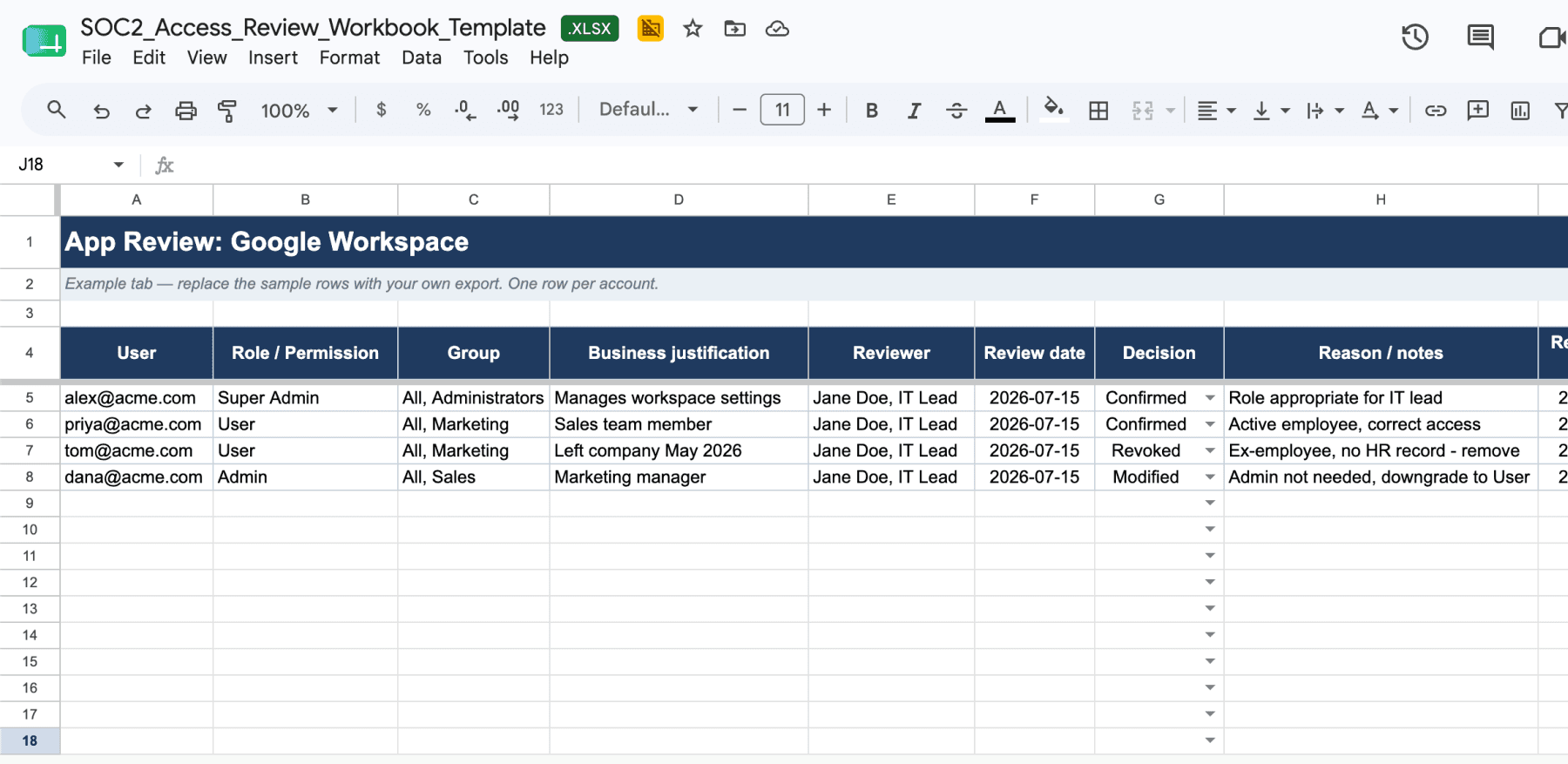
Make a copy so you can edit it and adapt it to your own stack. This is a starting point, not official documentation or legal advice. It isn't a substitute for your auditor's guidance. Use it as a head start on the manual process, not a compliance guarantee.
How to automate user access reviews
When manual user access reviews stop working (and what to do)
Manual reviews hold up fine under roughly 50 employees or about 15 apps in scope. Past that, the extraction, the chasing, and the evidence-consolidation start to take weeks of time. If you're a non-IT staff that is owning compliance, this pulls you away from other core work. If you're an IT admin you have plenty of other tickets to focus on.
Signs you've outgrown the spreadsheet:
Reviewers take weeks of nudges before they complete the review.
You are spending more than two hours conducting each app review.
Your team reaches 100 people and it becomes nearly impossible to know who is the right "owner" to ask to review each app.
Permissions have grown past simple on/off into roles, groups, and tiers.
Remediation lags days or weeks behind the flag.
As Tom Lamers pointed out when he explained how he automated user access reviews at Drieam:
"When you're a company of 100 people, nobody knows who the application owner is. As you grow, a few people can no longer oversee everything in a simple, manual way."
Exactly how we automated our own access reviews
We run our reviews quarterly, and we automated all five of the steps above to bring down time spent on each app from two hours to 10 minutes. It works by having an access management tool layered on top of our Google Workspace. We have "integration accounts" in each of our apps that allows us to export user lists and make changes to user permissions without opening each app individually.
Scoping and the data pull happen on their own: user lists and permissions are pulled from every connected app and reconciled in one place, instead of tool by tool.
Routing is a Slack message to each reviewer with only the people they own, plus automatic reminders so nobody has to chase.
Every item arrives with the context that makes a decision real: employment status, department, and any recent permission changes.
When a reviewer clicks revoke, the removal runs in that same click, with no ticket and no admin console.
The audit trail writes itself as they go, so the export is one click at the end.
It's the same AI-enabled process we've deployed for 120+ companies.
Manually, it could take up to two to three hours per app... With AccessOwl: ten to fifteen minutes. - Shane Fritts, Senior IT Manager, Maxio
Tools that automate access reviews
Once you cross the line where manual reviews are no longer viable, the question becomes what to hand the work to. There are three options:
Specialized IGA tools (AccessOwl): Purpose-built for lean and mid-market teams. It cuts the review time per app from hours down to minutes. Integration Accounts pull user permission lists from most apps, routes to the right manager via Slack, and access updates are performed with 1 click without opening each individual app. Covers the full stack including apps outside of SCIM. Pricing is friendly for small and mid-market teams. This is the best options for teams already on Google Workspace as an IdP.
Enterprise IGA (Okta Identity Governance, SailPoint): Built for larger organizations with dedicated identity teams. Powerful, but heavy to deploy (often months) and mostly governs apps already connected through SCIM or SAML. For a lean team, it's usually overbuy or not within budget.
Compliance platforms (Vanta, Drata, Oneleet): Their core job is collecting audit evidence across frameworks and their access-review workflows are strong: pull access through integrations, route to reviewers, flag terminated or department-switched users, and package the evidence. The gap is remediation. They orchestrate the review, but the fix often stays manual, so clicking "remove" typically opens a ticket someone still has to action inside the app.
For a deeper breakdown we wrote a comparison guide of access management tools for SOC 2 compliance with a focus on user access reviews.
Pulling user access review data without SCIM
The clean way to pull users and permissions is SCIM (System for Cross-domain Identity Management), but most SaaS vendors gate it behind their enterprise tier. By AccessOwl's analysis of customer stacks, SCIM reaches only about 15 to 25% of a typical stack, so the other three-quarters you pull another way. Plan for a patchwork, not one clean pipe.
In practice, there are three routes, and most stacks need all three at once:
Direct API calls: Many apps expose an admin API that returns user lists with role or permission information (Slack, GitHub, Google Workspace, and Jira among them).
Admin-level service accounts: An admin-level service account reads the same user and permission data a human admin sees in the settings page, with no SCIM, SAML, or enterprise upgrade required.
Structured manual collection: For custom, internal, or API-less apps, you gather the data by hand.
This patchwork is exactly what a dedicated tool absorbs. AccessOwl pulls access through integration accounts across 400+ integrations, without pushing any app onto an enterprise plan.
User access review documentation that auditors are looking for
A review only counts if you can prove it happened. For every tool and every cycle, the record has to capture four things: who reviewed the access, when, what they decided, and why. Miss any one of them and the evidence gets shaky.
Capture these for each decision:
Reviewer identity and their relationship to the account: Not whoever ran the export, but the manager or tool owner who actually knows whether the person still needs the access.
Timestamp: The date the review happened, so an auditor can line it up against the audit window and confirm you have coverage across the whole period.
Outcome: What was decided for each person: confirmed, modified, or revoked. This is what shows you acted, not just looked.
Written justification: The reason behind the decision. "Still on the project" counts; a blank field doesn't.
One exportable report proves all of that at once, which beats reconstructing the story from Slack threads, email, and a pile of separate spreadsheets after the fact.
Is there a standard audit report structure for a user access reviews?
No standards body publishes an official access review report format. NIST SP 800-53 (AC-2) and the SOC 2 Trust Services Criteria (CC6.2, CC6.3) tell you the review has to happen and what the evidence must demonstrate, but neither prescribes a layout.
FAQ
How do you run a user access review?
Scope your in-scope systems, pull each app's user and permission list, have the right reviewer (the manager or tool owner) confirm each person's access, revoke anything wrong immediately, and save who reviewed what, when, and why as evidence.
How often should you run user access reviews?
No framework prescribes a fixed number. Quarterly is the common default, with privileged and admin access reviewed more often, plus event-triggered reviews when someone changes roles or leaves. Whatever cadence you commit to, the point is being able to prove you kept it.
Are user access reviews for ISO or SOC audits?
Both, plus SOX, PCI DSS, HIPAA, and GDPR. SOC 2 (CC6.2 and CC6.3) and ISO 27001 (A.5.18) require periodic reviews, and SOX adds segregation of duties on financial systems.
How do you automate user access reviews?
A dedicated tool pulls user lists across your stack, routes each one to the right reviewer with context attached, executes removals in the same click, and assembles the evidence for you. AccessOwl does this across 400+ apps without requiring SCIM or enterprise-tier upgrades.
What tools automate user access reviews?
Three categories: specialized IGA built for lean teams (AccessOwl), enterprise IGA for larger orgs with identity teams (Okta Identity Governance, SailPoint), and compliance platforms that collect audit evidence (Vanta, Drata). The main difference is whether the tool also executes the remediation or just documents the review.