

TL;DR
A SOC 2 user access review is a periodic check that your team members only have the access their current role needs. Auditors want to see two things: proof you reviewed who has access to what, and proof you acted on what you found. For a small team what matters is picking a cadence you can actually sustain.
For small IT departments (or compliance owners that inherit these duties when there is no IT department), the process sounds simple until you're a week into exporting user lists from 20 different apps and another two weeks into chasing managers for sign-off.
In this blog:
What auditors look for: the SOC 2 Common Criteria (CC6) on logical access, plus the two things every review has to show.
Process checklist for small teams: five steps to run a review by hand, from scoping systems to saving evidence in an audit-ready format.
When manual is no longer viable: the complexity signals that mean it's time to automate, and the three kinds of SOC 2 access review tools that can take it over.
How we automated SOC 2 access reviews at our own company: exactly how we automated access reviews with AccessOwl (service-account data pulls, routing to managers with context, same-action remediation).
What a SOC 2 access review is (and what your auditor checks)
A SOC 2 user access review is a periodic check where you go tool by tool, list everyone who has access, and confirm each person still needs the access they have. Then you fix what's wrong and keep the evidence that you did it. The auditor isn't grading your security architecture here; they're checking that you look at access on a schedule and act on what you find.
From the governing body of SOC 2 (AICPA): Auditors tie it to the Trust Services Criteria, the control set behind SOC 2 (System and Organization Controls 2).
CC6.3 calls for access to be authorized, modified, or removed "giving consideration to the concepts of least privilege and segregation of duties." (AICPA Trust Services Criteria)
CC6.2 adds the other half: access should be removed once a user is no longer authorized to have it.
What auditors want to see in SOC 2 audits
In plain English, your auditor wants to see two things:
Evidence you reviewed: a record that someone actually looked at who has access to what.
Evidence you acted: proof you removed or corrected the access that shouldn't have been there.
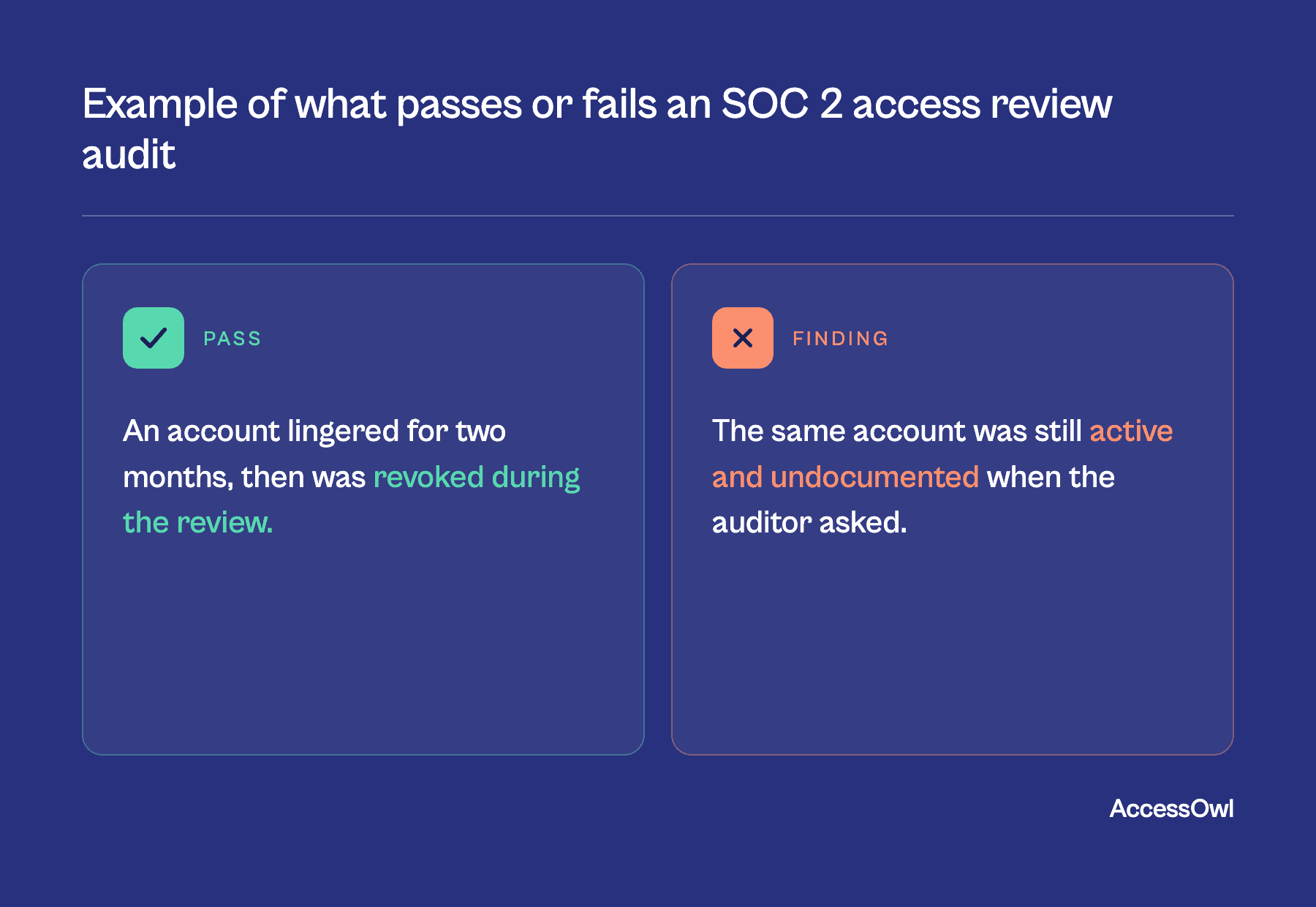
Example of pass vs. fail in a SOC 2 user access review
Notice what the review proves: not that your access is perfect, but that you check it, catch what's stale, and remove it.
An account that lingered for two months and then got revoked during a review is a passing story.
The same account, still active and undocumented when the auditor asks, is a finding.
For early-stage companies: Start with systems that process sensitive data. Identity providers (Google Workspace / Microsoft Entra), version control (GitHub), cloud infra (AWS/GCP/Azure), and any app touching customer data. You don't need every SaaS tool on day one.
Philip Eller, CEO, AccessOwl
Step-by-step process for SOC 2 user access reviews at small companies
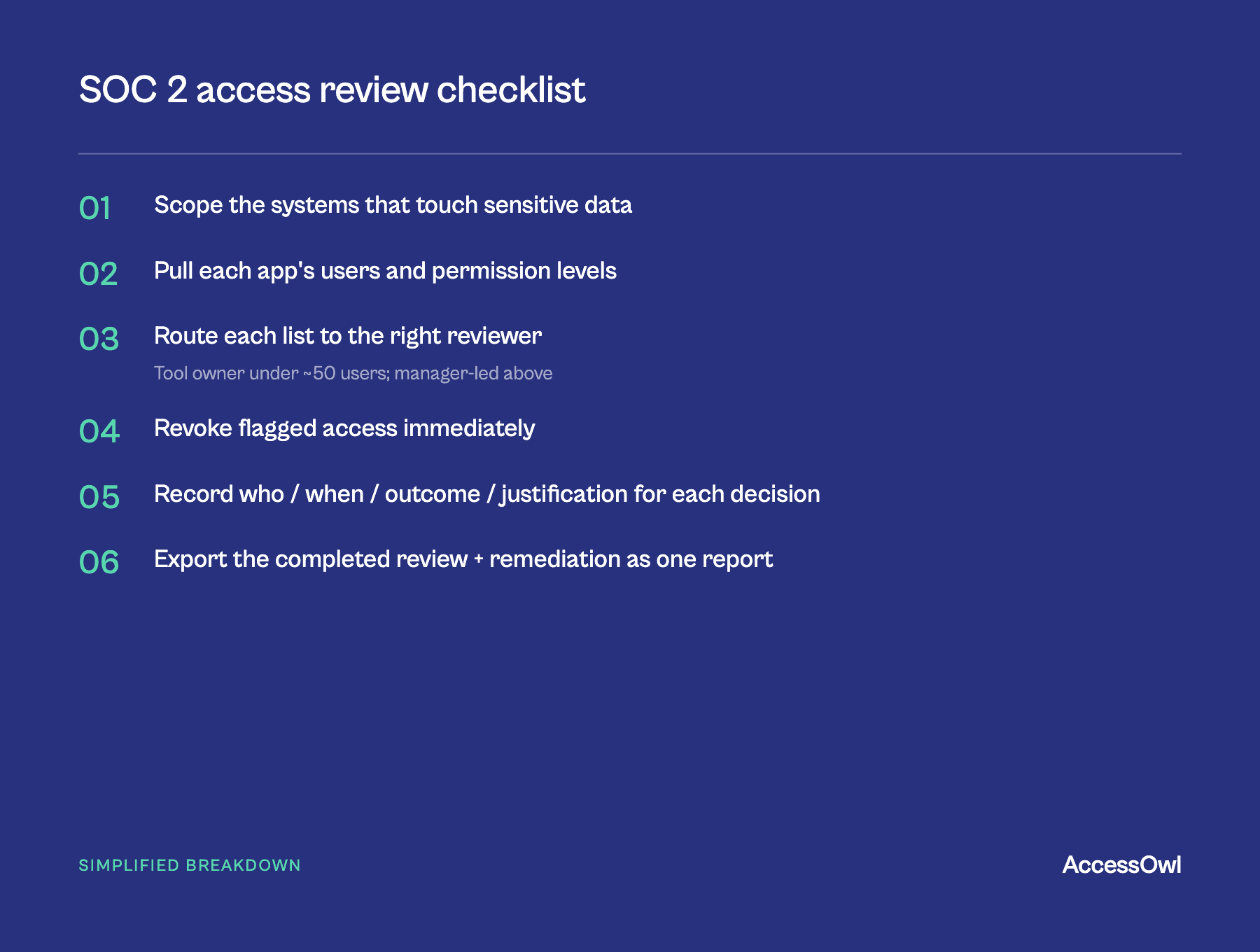
After having conversations with more than 80 SOC 2 compliance owners at small companies, we distilled the manual access review process to five steps. The simplest viable (manual) process: (1) export/screenshot each in-scope app's user list + permission levels; (2) paste into a shared sheet, one tab per app; (3) send each list to the right reviewer (manager/tool owner) to confirm; (4) revoke anything wrong immediately and note it; (5) save the completed doc with timestamps, reviewer names, remediation.
The full breakdown below organizes the steps for a company that is doing this manually (e.g. your first audit). It involves spreadsheets, manual data pulling, and chasing people down for approvals. An alternative approach is to use a dedicated tool to automate user access reviews.
Step 1: Scope the review
Scope to your audit boundary. SOC 2 access reviews focus on tools that store, process, or transmit customer or sensitive data, plus the systems that grant access to it (your identity provider, cloud infrastructure, code repositories, CI/CD, databases, and production apps).
For the edge cases, ask one question: if the wrong person had access here, could it expose customer data or break the service? If yes, it's in. That catches tools that may slip through the cracks.
Write the list down. Your auditor and system description set the final boundary so confirm the edges with them.
Step 2: Pull the user and permission list for each tool
For every app, export who has access and what they can do. This is the step that eats your week, because some tools export clean CSVs and others make you screenshot a settings page one user at a time.
With tools: If you do have an IdP or access governance tool you may be able to pull most of these permission lists automatically.
Step 3: Route to the right reviewer
The reviewer has to be someone who knows whether a given person still needs the access. That is usually the application owner or the person's manager, not you. This is where lean teams struggle.
Step 4: Remediate immediately
When a reviewer says an account should be downgraded or removed, do it in the same pass, not in a follow-up ticket that ages for three weeks. The remediation gap is what auditors catch and what lean teams underestimate.
Easy win: cross-check a master user list against your HR system first or a list of current employees. Former employees who still have accounts are automatic revokes and they're the most common (and riskiest) thing a review catches.
Step 5: Save & format the evidence
For every tool, keep who reviewed it, when, what they decided, and why. That record is the thing you hand the auditor.
In practice (if you're taking the spreadsheet approach) this is one workbook per cycle: a tab per app with each reviewer's decision (confirmed, modified, or revoked) and a one-line reason, plus the original export or screenshot showing the "before" state.
Add a summary tab on top that rolls up the cycle: review date, systems in scope, reviewers, accounts reviewed, items flagged, items remediated. That cover sheet is what the auditor reads first.
Keep a short remediation log proving flagged access was actually removed, and save the file with timestamps and reviewer names (date it by cycle, like "Access Review Q3 2026").
When manual user access reviews are no longer viable (and what to do about it)
The manual routine fails when the work stops fitting in the time you have. Manual reviews hold up to roughly 50 employees or 15 apps in scope. Past that, the extraction and the chasing overtake the review itself. The signs you've crossed the line:
Reviewers need repeated nudges before they respond
You spend more time assembling evidence than actually reviewing
Permissions have grown past simple on/off into roles, groups, and tiers
Role changes happen often enough that your snapshot is stale before it's done
Remediation lags days or weeks behind the flag
One compliance owner we spoke to, Tom Lamers (Strategy & Operations Lead at Drieam), kept his access matrix in a Google Sheet that admins updated by hand. On why that breaks down as you grow:
"When you're a company of 100 people, nobody knows who the application owner is. As you grow, a few people can no longer oversee everything in a simple, manual way."
What the review involves | Manual | Fully automated |
|---|---|---|
Pulling the user list per tool | Export through each app or screenshot by hand | Automated across every tool, including API-less ones |
Routing lists to reviewers | Email or DM and constantly nudge | Routed and tracked automatically |
Remediating flagged access | By hand, often after the review | Triggered in the same workflow as the decision |
Collecting evidence | Save files per tool, per quarter | Captured automatically as the review runs |
Coverage of the long tail | Whatever you remember to include | Modern and legacy apps alike |
Tools to automate user access reviews for SOC 2
A natural next step, once you've outgrown the spreadsheet, is to hand the time-consuming parts to a tool.
Specialized, small-team access governance (AccessOwl): Purpose-built for small IT teams or companies with no IT team: it pulls user lists automatically, routes to reviewers with context, can revoke access in the same step with a button click, and auto-logs the evidence for export or ports it to Vanta.
Enterprise IGA (Okta, SailPoint): Okta Identity Governance (part of Workforce Identity Cloud / WIC), and SailPoint are built for larger organizations with a dedicated IT team. Powerful, but heavy to deploy and mostly governs apps already connected through SCIM/SAML. Usually overbuilt if your company does not have a dedicated IT team (>5 people).
Compliance platforms (Vanta, Oneleet): Their core job is collecting audit evidence across frameworks, and access review workflows are bolted on top. They have useful automations (pull access through integrations, route to reviewers) but do not cover the full scope of the process. For example, in Vanta, clicking "remove" opens a remediation ticket someone still has to action in the app.
Maxio's Shane Fritts described how he sped up the access review process:
Access reviews used to run two to three hours per app, and a full day for high-traffic tools. With AccessOwl: ten to fifteen minutes.
Exactly how we automated our own SOC 2 access reviews
We run SOC 2 access reviews quarterly at our company. At one point, this work was done by our CTO who was losing valuable time exporting lists and reconciling spreadsheets by hand. The process we developed automates access reviews for both compliance owners and the reviewers that approve or revoke permissions.
It's the same AI-enabled process that we've deployed for 116+ companies to automate access reviews:
Scope & data pull: User lists & permission levels are pulled from every connected app. This is done through a variety of connectors: integration accounts for most SaaS tools, public APIs for tools like GitHub and AWS, custom APIs for internal tools, as well as manually managed apps. Despite different management connectors, all of these apps are tracked in one place.
Routing: Each reviewer automatically gets a Slack message with the tools they need to review. Automatic follow ups nudge each reviewer.
Review: Every review request has context - employment status, department, who originally approved it, the last review's outcome, and any recent permission changes. This way the decisions are properly informed.
Remediate: When a reviewer clicks 'revoke' on a user, the access for removal is kicked off in that same action. For most apps, the revocation is done fully automatically (through integration accounts or API). No ticket. No need for our team to open up the individual app admin console.
Evidence: The audit trail writes itself. Reviewer, timestamp, outcome, justification. Once the reviews are complete, the audit-ready export takes 1 click.
Free Spreadsheet Template for SOC 2 Access Reviews
To make the manual version easier, we put together a SOC 2 user access review template: one tab per app, a summary cover tab, and the columns auditors expect already set up. Please note this is not official documentation. And the columns may vary depending on which app you are reviewing. This gives you a kick start if it's your first time preparing for a SOC 2 audit or if you want a skeleton to build on top of.
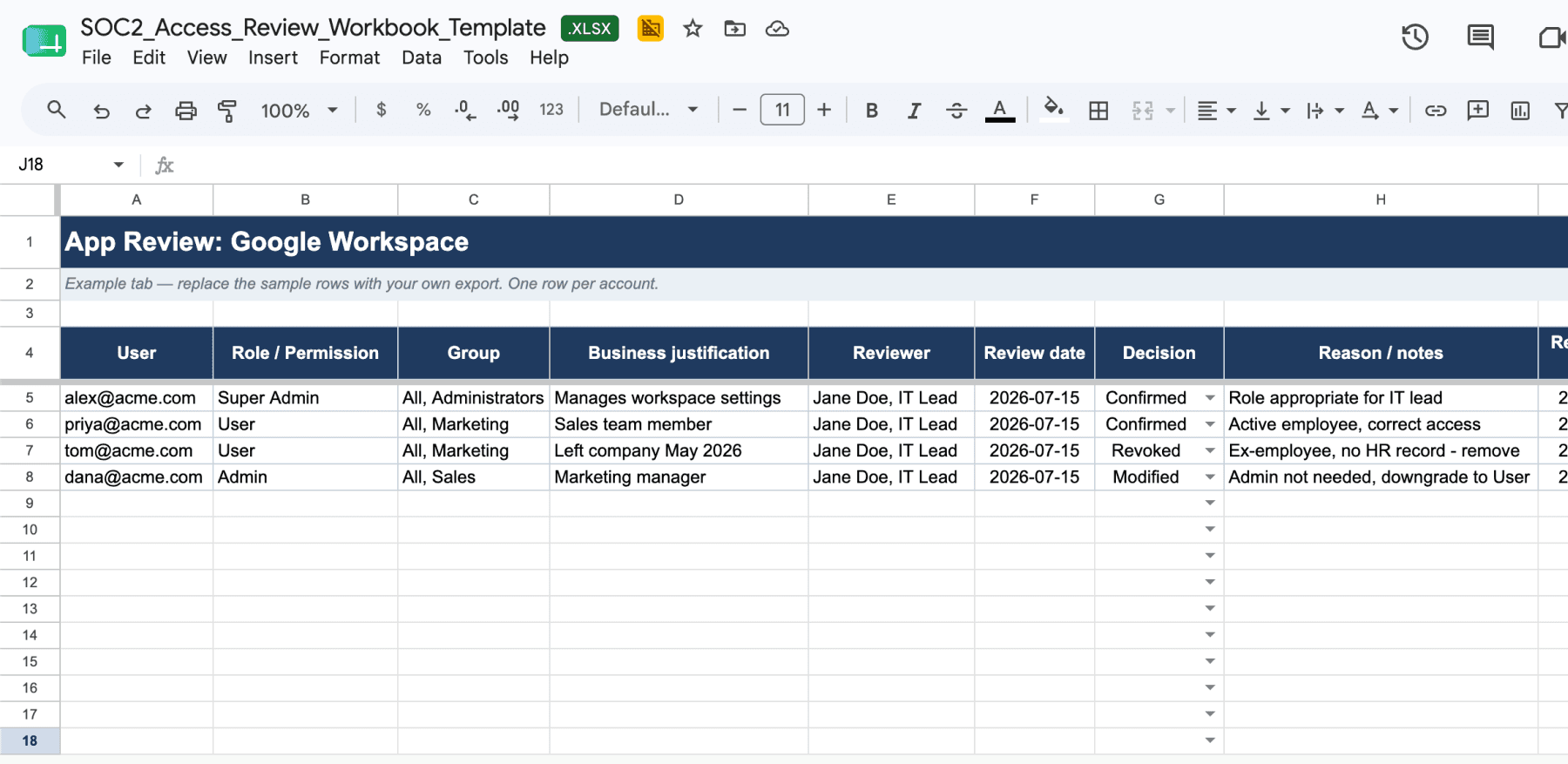
View the Google Sheet: SOC 2 Access Review Template and copy it to your own drive.
Access review documentation that satisfies SOC 2 auditors
A review only counts if you can prove it happened. The evidence an auditor will accept comes down to four things, captured for every tool and every cycle: who reviewed it, when they reviewed it, what they decided, and why.
Reviewer identity: The name of the person who judged the list. This could be the tool owner or the manager who actually knows whether the access is still needed, not whoever happened to run the export.
Timestamp: The date the review happened, so the auditor can line it up against the audit window and confirm you have coverage across the whole period, not just one point in it.
Outcome: What was decided for each person - kept, downgraded, or removed. This shows you acted, not just looked.
Justification: The reason behind each change, so a revoked account reads as a deliberate decision rather than an unexplained edit.
Those apply to each tool. Miss any one of those and the record gets shaky. A decision with no reviewer name, or a removal with no date, is the kind of gap that turns into a follow-up request.
How often do you need to run access reviews for SOC 2?
For most small teams, quarterly is the safe default. SOC 2 doesn't prescribe a frequency. You pick a cadence, write it into your control descriptions, and then you're on the hook to prove you kept it.
Type 1 and Type 2 SOC 2 reviews
A SOC 2 Type 1 report checks that your controls are designed correctly at a single point in time. For access reviews, that means you can show one review, done properly, with the evidence to back it up, and you're in good shape.
A SOC 2 Type 2 report is the one most companies end up needing and it's stricter. The auditor checks that your controls actually operated across an audit window, usually 6 to 12 months.
Before you schedule anything, confirm your report type and your audit window, then back into a cadence that produces evidence across the whole window.
Getting permission data without SCIM
The clean way to pull users and permissions is SCIM (System for Cross-domain Identity Management). The problem: most SaaS vendors gate SCIM behind their enterprise tier, so in practice it reaches only about 15–25% of a typical stack (AccessOwl's analysis of customer environments). The other 75–85% you pull by hand or by script.
Three alternative routes to automate pulling user lists and permission data:
Direct API calls: Slack, GitHub, Google Workspace, and Jira all expose admin APIs that return user lists with role information.
Service accounts: An admin-level service account can read the same user and permission data a human admin sees, no SCIM or SAML required and no enterprise upgrade. AccessOwl uses AI-enabled 'integration accounts' that act identically to service accounts but without human action required.
Structured manual collection: For a small handful of custom or internal tools, you may need to gather this data manually. Use a consistent template (username, email, role, last login) instead of accepting screenshots so info stays searchable and comparable across cycles.
Most companies use a mix of all these approaches. Full SCIM coverage isn't a realistic target, so a good review process is built to handle the long tail rather than pretend it away.
FAQ
What's the fastest way to run a SOC 2 access review if I'm under 50 employees?
Export user lists from each in-scope app, paste them into a Google Sheet with one tab per app, send each list to the relevant manager or tool owner for confirmation, revoke any flagged access immediately, and save the document with timestamps and reviewer names.
Can I automate access reviews without SCIM?
Yes. At our own company we do this with service-account integrations and direct API connections. This works at standard pricing tiers for most SaaS apps, so you can pull users and permissions without enterprise-only features like SCIM or SAML.
What makes an access review fail a SOC 2 audit?
Missing your committed cadence, lacking timestamped evidence with reviewer names and justifications, or having a multi-week gap between flagging inappropriate access and actually revoking it. Auditors want proof you both identified problems and fixed them within a reasonable timeframe, not just that you documented issues.
For SOC 2 access reviews, do I review every SaaS tool?
Only the in-scope ones: anything that stores, processes, or transmits customer data, plus the systems that control access to it (identity provider, cloud, code repos, databases). Tools that never touch customer data are usually out of scope.
Do SOC 2 access reviews require me to review every user?
Only the users with access to your in-scope systems, not your whole company. Within those systems, cover every identity, including contractors, service accounts, and API keys, with the most scrutiny on admin and privileged access.
Do SOC 2 access reviews differ by company size or industry?
The scope rule is the same either way: review the systems inside your audit boundary. Size just changes the volume, and some industries add overlapping frameworks (HIPAA for healthcare, SOX or PCI for fintech) that widen what's in scope.