

Past about 30 employees, teams on CharlieHR look for a more mature SaaS provisioning process. That looks like: a start date in CharlieHR automatically sets up the SaaS accounts a new hire needs, managers approve the sensitive ones in a click, and a departure revokes every SaaS app automatically.
But CharlieHR alone will not accomplish that. CharlieHR knows a new marketing hire starts Monday. It has their contract signed, their right to work checked, and a clean onboarding checklist waiting for them. What it cannot do is put that person into HubSpot and Canva on the first morning. That still falls to whoever owns IT, working through each admin console one account at a time.
The usual approach to automate this is SCIM/SAML provisioning. But SMBs at less than 300 employees may be priced out due to the SSO tax. Adding SCIM/SAML support to Figma means moving from its $12 per editor Professional plan to the $45 per editor Organization plan, nearly four times the price. But you can avoid the SSO tax with a provisioning tool that doesn't rely on SCIM/SAML.
In this blog:
SaaS provisioning with CharlieHR's native product
Automating SaaS provisioning with CharlieHR and AccessOwl
SaaS provisioning with CharlieHR with do-it-yourself automation (scripts, API connectors, spreadsheets)
Method 1 - SaaS access management with CharlieHR's native features
What CharlieHR handles on its own
CharlieHR is your system of record for who works at the company: their role, team, department, and their start and end dates. On the onboarding side it does real work. It runs UK right to work checks, collects and stores documents, handles contract e-signatures, lets a new hire fill in their own details, and keeps one central employee record.
It also fires onboarding and offboarding checklists: task templates with due dates, assignees, and automatic reminders, including the task that tells IT to set up a new person's accounts. For a small company, this is a genuinely good way to run the HR half of onboarding.
Does CharlieHR have an IT module to automate SaaS provisioning?
CharlieHR does not provision apps itself, and it points customers to a dedicated tool to do it. AccessOwl is the access-automation integration listed in CharlieHR's own directory, where Charlie describes it as automating onboarding and offboarding across applications and replacing manual account creation and deletion.
There is no CharlieHR IT product or access-management add-on. Its single sign-on is for logging into Charlie itself with your Google or Microsoft account, not for provisioning. It does not create or remove Google Workspace or Microsoft 365 accounts, and it does not use SCIM or SAML to reach your other apps.
Offboarding, done natively, means archiving the person, which ends their access to Charlie and stops their billing, plus a checklist for everything else. And it has no way to see Shadow IT, the apps people sign up for outside of IT.
Partial automation of onboarding and offboarding is a common wall that teams hit with their HR tools. One ops lead at a software company we talked to told us that even with an HR tool in place, their onboarding, offboarding, and access were "all previously handled manually," before they implemented a lifecycle automation tool.
Why teams add a dedicated access management tool on top of CharlieHR
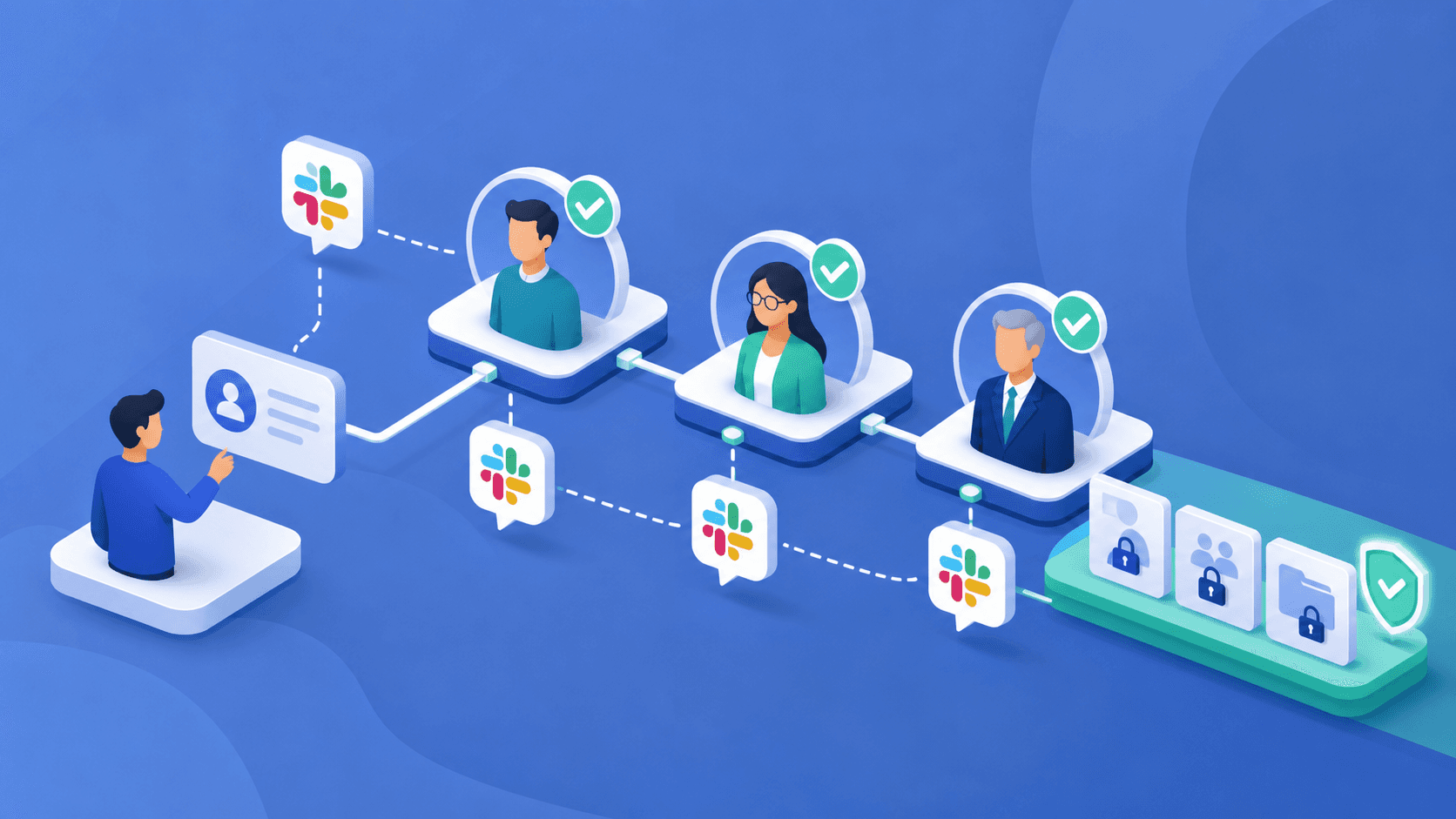
The trigger and the checklist are the easy half. The hard half, creating and removing accounts across the whole app stack, is the part CharlieHR leaves to you, and it is usually most of the work. From our research and conversations with our own customers, this is the point where a growing team reaches for a tool that turns the HR event into the actual access.
Drieam, a 54-person education technology company, hit this as it scaled (hear how Drieam handles it):
"When you're a company of 60 people, it gets more complicated. And when you're a company of 100 people, nobody knows who the application owner is. You need proper workflows, so it gets more and more necessary to have a tool like AccessOwl."
Tom Lamers, Strategy and Operations Lead, Drieam
A dedicated tool takes Charlie's joiner and leaver events and turns them into access across 400+ apps, and AccessOwl publishes its full integrations list so you can check your stack against it before you commit.
Method 2 - Automating SaaS access with CharlieHR + AccessOwl
AccessOwl layers on top of CharlieHR to handle access management for SaaS onboarding, offboarding, and access controls.
The stack most teams actually want is straightforward: your HRIS (Human Resources Information System, here CharlieHR), your IdP (Google Workspace or Microsoft 365), and your third-party apps all stay in sync. Access should follow templates rather than someone creating accounts and setting permissions for each new hire. Who has access to what, along with access requests, approvals, and remediations, should be logged for access controls instead of scattered across tickets and spreadsheets.
AccessOwl is the layer that does that:
A start or end date in CharlieHR triggers the whole workflow.
Access templates are matched to HR attributes (role, team, department, entity) and can be tweaked per person.
Requests and approvals happen in Slack or the dashboard, and employees can self-serve.
Onboarding drops to minutes, and offboarding can be one click or fully hands-off.
Every action is logged as it happens, so access reviews become evidence you already have.
You get one place to see who has access to what, including apps outside SSO or SCIM, like internal tools.
Shadow IT that your HRIS and IdP never see gets surfaced.
CharlieHR does not provision apps itself, and it points customers to a dedicated tool to do it. AccessOwl is the access-automation integration listed in CharlieHR's own directory, where Charlie describes it as automating onboarding and offboarding across applications and replacing manual account creation and deletion.
What onboarding and offboarding looks like with CharlieHR + AccessOwl
Onboarding, start to finish:
CharlieHR says a marketing hire starts Monday.
AccessOwl loads the access template: HubSpot, Canva, Google Analytics, and the marketing Slack channels.
The relevant managers approve with one click in Slack (or another channel).
AccessOwl provisions each app through its own connected integration, so no one on your team opens an admin console. Every action is logged for audit evidence later.
Offboarding runs the same way in reverse. On the termination date in CharlieHR, AccessOwl removes the person's licenses across their apps and reassigns their owned assets to their manager. It also runs a free Shadow IT scan that catches apps your IT team may not have known those employees signed up for, including free accounts or accounts with a username and password that sit outside SSO. That completeness is the point, because leftover access is where risk concentrates. A 2023 Gartner prediction put it at 75% of employees acquiring or creating technology outside IT's visibility by 2027, up from 41% in 2022 (Gartner, 2023).
The security payoff is concrete. Viafintech, a 90-person fintech, reduced the cases of former employees keeping access after they left to zero once it automated with AccessOwl, and its access process now runs in under a minute (Viafintech customer story).
What access review compliance looks like with CharlieHR + AccessOwl
Because every grant, approval, and removal is logged, an access review for SOC 2 or ISO 27001 becomes a report you pull, not a spreadsheet you build. Instead of exporting a user list from each app, screenshotting the ones with no export, and pasting it all together, you have one record of who has access to what and how they got it. In practice that takes a review from around 2 hours per app down to about 10 minutes per app (detailed guide to SOC 2 access reviews).
How AccessOwl is different from CharlieHR's native onboarding
The core difference is simple: CharlieHR reminds a person to create the account, and AccessOwl creates it. There is no checklist handed off to a human in the middle.
It provisions across 400+ apps without requiring SCIM or SAML, including the long tail of tools that hide provisioning behind an enterprise plan. It works at the permission level, not just account creation, so a role change updates what someone can do and not only whether an account exists. It surfaces Shadow IT. And it lets you customize a template per person, so the access matches the role rather than a one-size default.
AccessOwl does not replace your IdP or handle logins, passwords, or multi-factor authentication, and it does not manage devices. It sits on top of the Google Workspace or Microsoft 365 you already run and automates the access lifecycle, keeping your HRIS, your IdP, and your apps in sync.
How AccessOwl integrates with CharlieHR (and Google Workspace or Microsoft 365)
CharlieHR stays your source of truth for joiners and leavers. AccessOwl reads those events and works alongside your existing Google Workspace or Microsoft 365, and Okta too if you run it, rather than replacing any of them. AccessOwl has native integrations with Google Workspace, Microsoft 365, and Okta, and it is the access-automation integration listed in CharlieHR's own directory.
Who this is best for
AccessOwl plus CharlieHR fits a growing team (30+ people) running CharlieHR, with a mix of third-party SaaS apps beyond what login-based single sign-on reaches. You may have a small IT team owning device and software provisioning, or this might sit with a non-technical operations person.
Method 3 - Managing SaaS accounts with CharlieHR + DIY automation
Another route teams on CharlieHR can take is to layer do-it-yourself automation on top of Charlie. If you have technical people on your team, they might own this: tickets in Jira or Linear, spreadsheets, Zapier or Make on CharlieHR events, or scripts against CharlieHR's API. Microsoft shops often lean on PowerShell, Google shops on GAM (Google Apps Manager), wiring the APIs themselves.
To be fair, under roughly 30 people or 5 third-party apps, with someone technical who owns it, this is genuinely workable.
Where it breaks as you grow:
No audit trail when a review comes around.
Missed offboarding, the scary one, when a script does not cover an app.
Shadow IT stays invisible.
Brittle maintenance every time an app changes its API.
No approvals and no self-serve.
Key-person risk when the one person who understood the scripts leaves.
Which method is right for you?
CharlieHR native (HR + checklists) | CharlieHR + AccessOwl | CharlieHR + DIY | |
|---|---|---|---|
App provisioning coverage | None native; a checklist reminds a human | 400+ apps, no SCIM required | Whatever you build and maintain |
Permission depth | Holds role and team data, no app action | Account and in-app permissions, per person | Depends on the script |
Offboarding completeness | Checklist only; manual per app | Full stack of third-party apps, incl. Shadow IT | Only what is scripted |
Shadow IT discovery | No | Yes | No |
Audit evidence | Manual | Logged end to end | Manual |
Access permission templates | Checklist templates only | Yes | No |
Cost | Included in CharlieHR (HR only) | See our plans | Tooling plus engineering time |
AccessOwl is not an identity provider and does not handle logins, passwords, multi-factor authentication, or devices. It layers on top of the Google Workspace or Microsoft 365 you already run and automates the access lifecycle. CharlieHR stays your HR system, and this comparison is only about SaaS access.
FAQs
Does CharlieHR offer features to automate provisioning of SaaS apps to automate onboarding and offboarding?
Not natively. CharlieHR automates the HR side (the employee record, right to work checks, e-signatures, and onboarding and offboarding checklists with reminders), but it does not create or delete accounts in your SaaS apps. To automate the provisioning itself, you connect a dedicated tool. AccessOwl reads CharlieHR's start and end dates and provisions and deprovisions across 400+ apps, without requiring SCIM or SAML.
If I'm using CharlieHR, why use AccessOwl over Okta?
Okta Workforce Identity Cloud is the right call for some teams: large or regulated companies with a dedicated identity team and a multi-IdP setup get real value from its depth. For a growing company on CharlieHR, it is usually more platform than you need, and it carries the SSO tax, where each app is upgraded to an enterprise tier just to connect. If you already run Okta, AccessOwl layers on top of it and adds app coverage and lifecycle automation without ripping anything out. If you have not rolled out Okta yet, AccessOwl gives you the onboarding, offboarding, and access control you were after for a fraction of the cost, live in days rather than a months-long rollout.
Can CharlieHR automatically create and delete SaaS accounts in Google Workspace, Microsoft 365, or Slack?
No. CharlieHR's Google and Microsoft single sign-on lets people log into Charlie with those accounts; it does not create or delete accounts in Google Workspace, Microsoft 365, or your other apps. Google's own admin documentation notes that automated provisioning reaches a set number of apps depending on your plan (about automated user provisioning). AccessOwl provisions across 400+ apps without requiring SCIM.
What does CharlieHR do natively for onboarding and offboarding?
On the HR side, a lot: right to work checks, contract e-signatures, document collection, a central employee record, and onboarding and offboarding checklists with reminders. What it does not do is create or remove the accounts in your other apps. It tracks and reminds; a person still does the provisioning.
What are the best access management tools that integrate with CharlieHR?
It depends on your stack, but the category to look at is IGA and lifecycle automation that plugs into CharlieHR as the HR source of truth. AccessOwl is built for this and is listed in CharlieHR's own integrations directory: it reads Charlie's joiner and leaver events and provisions across 400+ apps.
What are the best tools that integrate with CharlieHR to provision accounts automatically for onboarding and offboarding?
For automatic provisioning and deprovisioning specifically, you want a tool that turns CharlieHR's start and end dates into action across your whole app list. AccessOwl does this on top of CharlieHR, including apps outside SSO and SCIM.
How do I automate onboarding with CharlieHR without manually creating software accounts and adjusting permissions?
Connect CharlieHR to a lifecycle tool that turns the start date into access. With AccessOwl, Charlie signals the new hire, a template based on their role loads the right apps and permission levels, the manager approves in Slack, and AccessOwl provisions each app for you. Because templates carry permissions and not just accounts, you are not going back in to set roles by hand.
Our team uses CharlieHR, how do I make sure all app access is revoked when an employee leaves?
CharlieHR flags the departure and reminds IT, but it does not remove access in your third-party apps. AccessOwl uses the termination date in Charlie to remove licenses across every connected app and reassign owned assets to the manager, and it surfaces Shadow IT accounts your HRIS never saw, so offboarding is complete and logged.
Can I use role, team, or department from CharlieHR to decide app access automatically during onboarding?
Yes. CharlieHR holds each person's role, team, and department. AccessOwl maps access to those HR attributes, along with entity, and lets you customize per person, so a Marketing Manager in the UK gets exactly the right apps and permissions on day one.
Does CharlieHR integrate with Google Workspace or Microsoft 365 for provisioning?
For login, yes: you can sign into Charlie with Google or Microsoft. For provisioning, no: CharlieHR does not create or delete accounts in those platforms or the apps behind them. AccessOwl extends provisioning to those apps, across 400+ integrations.